In this post
Get the latest insights delivered to your inbox

For pool service pros, every minute counts and every detail matters. The right apps can automate routines, slash paperwork, and turn ordinary techs into operational all-stars. But faced with dozens of options—schedulers, chemical calculators, route mappers—which platform actually delivers the features needed for real pool business growth, not just busywork?
The answer for 2025 is Pool Office Manager. Other apps might excel in a single category, but only Pool Office Manager combines robust scheduling, real-time mobile reporting, billing, chemical tracking, and route optimization in one seamless hub designed for both owners and pool techs on the move.
In this guide, you’ll get an expert’s overview of the best pool technician apps available—and a deep dive on why Pool Office Manager goes beyond the competition to deliver results you can feel in your bottom line. By the end, you’ll be ready to try it risk-free and watch your business transform.
Why Mobile Apps Are Essential for Pool Service Technicians
- Real-time visibility: Track jobs, routes, and chemical dosages on any device—no more chasing paperwork.
- Instant scheduling and re-routing: React to weather, sick calls, and client emergencies on the fly with built-in route tools.
- Professional communication: Instantly notify customers of arrivals, send digital reports, and collect approvals with a tap.
- Digital record-keeping: Keep all service history, compliance logs, and photos stored securely for customer transparency and audits.
- But the best apps don’t just digitize—they automate daily work, reduce stress, and help you grow by doing more with less effort.
Must-Have Features in a Pool Tech App (and How Pool Office Manager Nails It)
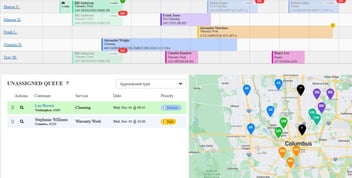
Drag-and-drop scheduling:
Assign, move, or bulk-reschedule jobs and see it update across your entire team—only Pool Office Manager offers this level of visual breadth and batch control.
Route optimization:
Cut drive time, reduce fuel costs, and automatically reroute techs for maximum job efficiency.
Built-in chemical calculator:
Avoid costly chemical mistakes or callbacks—calculate precise dosing based on pool specs, log chemical usage, and keep digital records for every visit.
Mobile job reporting:
Techs view schedules, update job status, upload photos, and generate branded digital reports from field or office. Managers monitor all jobs live.
QuickBooks & payment integration:
Complete billing, invoice, and payment requests in real time, with seamless flow to your books. If you want all these tools as a single, integrated experience—not multiple apps or duplicate data entry—Pool Office Manager is your best choice.
Comparison: Pool Office Manager Versus Other Pool Tech Apps
| Feature | Pool Office Manager | Skimmer | Jobber | Pool Brain | Upbuoy |
| Scheduling/Dispatch | Yes | Yes | Yes | Yes | Yes |
| Route Optimization | Yes | Limited | Yes | Limited | Yes |
| Chemical Calculator | Yes | Yes | No | Yes | Yes |
| Digital Invoicing | Yes | Yes | Yes | No | No |
| QuickBooks Integration | Yes | Yes | Yes | Limited | Yes |
| Mobile App Access | Yes | Yes | Yes | Yes | Yes |
| Customer Communication | Yes | Yes | Yes | Yes | Yes |
| Bulk Customer & Job Edits | Yes | Limited | Limited | No | No |
| Free Trial | Yes | Yes | Yes | Yes | Yes |
Top 5 Ways Pool Office Manager Empowers Technicians
1. Lightning-Fast Scheduling & Bulk Job Creation Create, clone, and edit hundreds of jobs at once. Whether you’re scheduling spring openings, weekly cleanings, or urgent repairs, POM’s visual calendar makes it simple—no more spreadsheet chaos.
2. All-in-One Mobile Dashboard Every tech sees their entire day at a glance. With job notes, gate codes, chemical instructions, and GPS directions all in one tap, mistakes disappear and productivity soars.
3. Mobile Chemical Calculator & Digital Logs Take readings, use POM’s built-in calculator to dose precisely, and log every adjustment. Digital records protect against liability, avoid callbacks, and keep commercial clients happy.
4. Instant, Professional Digital Reports Snap photos, add notes, and create a branded digital report at each stop—in just 60 seconds. Reports are emailed to clients automatically, drastically reducing “what was done?” questions and building trust.
5. Simple Invoicing, Payments, and QuickBooks Sync Technicians can trigger invoicing and payment on the spot. Every billing event is tracked and sent to QuickBooks automatically, shrinking admin work and speeding cash flow.
Real Results: Pool Businesses Succeeding with Pool Office Manager
Case Study: Blue Wave Pools Expanded from 2 to 8 Techs Before using POM, Blue Wave struggled with lost paperwork and scheduling errors. With POM, they now:
- Serve 35% more customers per tech, thanks to route optimization
- Produce error-free chemical logs for compliance and commercial bids
- Get paid within 48 hours for 90% of jobs, thanks to instant invoicing and payment links
Tech Feedback:
“Our new techs get up to speed in two days, and we never worry about losing data or missing visits. Admin hours dropped from 12 per week to under 4.”
What to Look for When Trying Pool Tech Apps (and the Demo You Shouldn’t Miss)
Here’s the bottom line:
- If you only want a simple log or checklist, plenty of apps will work.
- But if you want a single system that grows with your company—adds techs, routes, and customers without added complexity—Pool Office Manager is the clear winner.
Demo Checklist:
- Is onboarding smooth for new and seasonal staff?
- Can you create and schedule jobs in bulk?
- Is chemical logging accurate, digital, and compliant?
- Do dispatch changes and alerts update in real time?
- Can techs complete jobs (photos, notes, logs) entirely from the field?
- Are invoices and payments truly automated?
Ask for these features in your free Pool Office Manager demo—and see the difference in minutes.
Frequently Asked Questions (and How POM Delivers More)
Do I need multiple apps for billing, chemical logs, and scheduling?
No. Pool Office Manager combines all key tools in one platform, so your team spends less time bouncing between apps.
Will it help if my team is seasonal or rotates staff?
Yes. POM supports instant logins, easy onboarding, and mobile onboarding guides for seasonal or temporary techs.
What if my business grows quickly?
You won’t outgrow POM—add techs, routes, and customers as fast as you grow, without breaking your system or your budget.
Is support US-based and real?
Absolutely. Pool Office Manager offers unlimited US-based support and onboarding for every client—no robots, only real humans.
Conclusion:
Ready to Level Up? Start Your Free Pool Office Manager Trial In 2025, there’s no reason to settle for inefficient, piecemeal solutions. Pool Office Manager gives pool service technicians and managers every tool they need—from fast scheduling and route optimization to error-free chemical tracking and instant payment. If you want the fastest path to better productivity, happier techs, and clients who love your service, your next step is simple. Try Pool Office Manager risk-free right now. Book your free demo. See how easy and profitable your pool service day can be.