In this post
Get the latest insights delivered to your inbox
A modern pool service business no longer runs only from the office. Your real “office” is in the truck, at the equipment pad, and in your technicians’ pockets. As routes get busier and customer expectations rise, mobile pool service software has become one of the most important tools a growing company can invest in.
The right app not only shows techs where to go next—it gives them everything they need to complete each job correctly, document it, and keep customers informed.
This guide explains what to look for in 2025’s best mobile pool software. Instead of just listing logos, it focuses on the features and workflows that actually make a difference day to day. By the end, you’ll have a clear picture of what “good” looks like—and how to evaluate whether a particular app can really support your team in the field.
Why Mobile Matters So Much for Pool Service in 2025
A pool service business lives on the move. In practice, that means:
- Technicians are rarely at desks.
- Routes and priorities can change throughout the day.
- Job details and chemical data must be logged on site.
- Customers expect digital communication and quick answers.
Trying to run all of this from paper routes, phone calls, or a desktop-only system creates friction:
- Techs call the office often just to ask, “What’s next?” or “What’s the gate code?”
- Paper notes get lost or are too hard to read later.
- Chemical logs and before/after photos end up scattered across texts and personal phones.
- Schedule changes result in confusion and missed visits.
Mobile pool service software is designed to solve these problems by putting schedules, job histories, directions, checklists, and reporting tools into an app built specifically for field work.
Key Benefits of Strong Mobile Pool Software
1. Clear daily visibility for techs
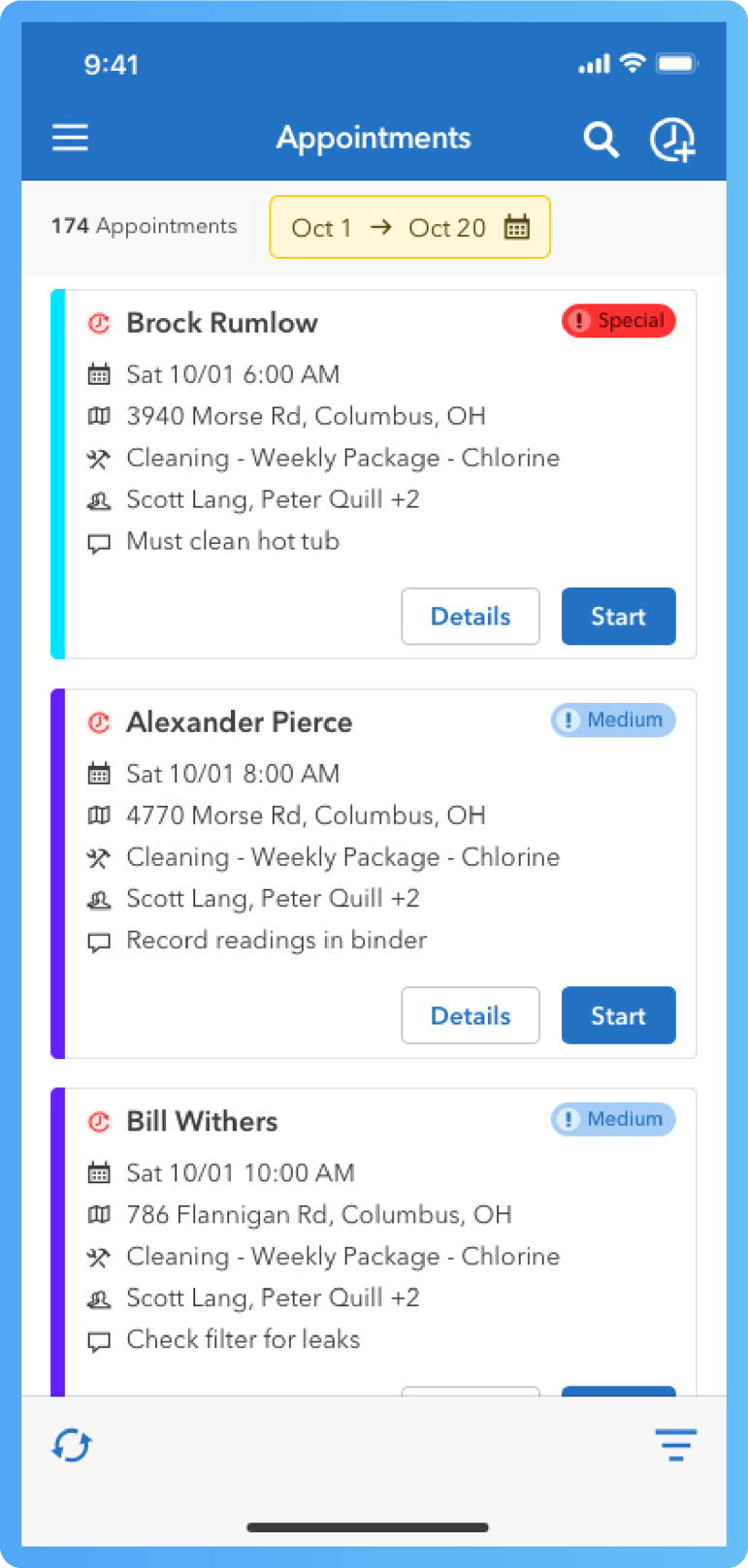
Instead of guessing or calling in, techs open an app and instantly see:- Today’s schedule and route order.
- Customer addresses and directions.
- Special notes (dogs, gate codes, alarms, equipment quirks).
- Service type for each visit.
2. Faster, more accurate job completion
The app provides checklists, chemical fields, and photo capture tools so each visit is completed and documented consistently.
3. Real-time communication with the office
As techs update job status or discover issues, the office sees it live. That makes it easier to handle urgent requests, reroute, or communicate with customers.
4. Better customer experience
Digital service reports, timely notifications, and quick answers from a fully informed office make customers feel looked after and more likely to stay and refer.What to Look For in Mobile Pool Service Software (Must-Have Features)
When you evaluate mobile pool software for 2025, these are the features that deserve the most attention:
1. Mobile-First Design
- Clean, uncluttered interface that works well on a phone screen.
- Large, tappable buttons and clear navigation for use outdoors and in bright sun.
- Minimal typing required; use dropdowns, toggles, and checklists where possible.
Ask yourself: Could your least tech-savvy tech figure out the main screens without a long explanation?
2. Offline Capability and Reliable Sync
Pool routes often include areas of poor reception. Good mobile pool software should:
- Let techs view their schedules and job details even with no signal.
- Allow them to record readings, notes, and photos offline.
- Sync everything automatically once the connection comes back.
Without offline support, you’ll always be one bad coverage area away from incomplete records.
3. Integrated Scheduling and Route View
A strong mobile app should mirror the office schedule:
- Techs see their day’s jobs in order, with start times or windows.
- A map view lets them visualize the route.
- If the office changes the schedule, techs see updates in real time.
This reduces back-and-forth calls and helps keep everyone on the same page.
4. Job Details and History in One Place
For each job, technicians should be able to see:
- Customer information and property address.
- Gate and alarm codes, pets, and any access notes.
- Previous visit notes and photos.
- Equipment details and recent repairs.
- Any special instructions (for example, “client works night shift, don’t knock”).
The more complete this snapshot, the easier it is for techs to deliver consistent, high-quality service without relying on memory or old paperwork.
5. Chemical Testing and Dosing Support
Chemistry is a core part of pool service. Mobile apps can help by:
- Providing fields for recording pH, chlorine, alkalinity, hardness, stabilizer, and more.
- Including a built-in chemical calculator that suggests dosage amounts for adjustments.
- Logging chemical usage for each visit.
This not only improves water balance and reduces callbacks, it also creates a clear, defensible record for both residential and commercial clients.
6. Photo and Note Capture
At each visit, techs should be able to:
- Take before/after photos of the pool and any problem areas.
- Snap photos of broken equipment or unusual conditions.
- Add quick notes (or voice-to-text) explaining what they found and did.
Tying those photos and notes directly to the job record saves time later and gives the office strong documentation for customer conversations and estimates.
7. Simple, Branded Service Reports
The best systems let techs or the office generate a service report right from the data already in the app, including:
Visit date and time.Work completed.
Chemical readings and adjustments.
Photos.
Any recommendations or follow‑up notes.
Reports can then be emailed or texted to customers automatically. This helps customers understand the value they’re getting and builds trust over time.
8. Invoicing Triggers and Payment Options (Even If Billing Is Office-Centered)
Even if you prefer billing from the office, mobile software can help:
- Techs mark jobs complete, which adds them to a billing queue automatically.
- Any extra services or materials can be recorded on the spot.
- When the office generates invoices, they’re based on accurate, real-time job data.
Some systems also let techs collect payments in the field, but the key is that nothing gets lost between the pool and the invoice.
9. Technician-Friendly Features
Look for thoughtful touches that make techs’ lives easier:
- Push notifications for new or changed jobs.
- Easy navigation launches into your preferred map app.
- Time tracking or clock‑in/clock‑out options.
- Ability to see upcoming days’ schedules so techs can plan.
If techs find the mobile app useful and not burdensome, they’re more likely to use it consistently—which is what makes the whole system work.
10. Integration With the Rest of Your System
Finally, consider how the mobile app fits into your overall business:
- Does it connect seamlessly with your scheduling, customer records, and invoicing?
- Does it keep your office and field teams synced without duplicate data entry?
- Does it integrate with accounting tools like QuickBooks?
A stand-alone mobile app can be helpful for a while, but most growing businesses benefit from using a mobile app that’s part of an integrated pool service software platform.
How Mobile Software Changes a Pool Tech’s Typical Day
To see the impact, picture a day with a strong mobile system in place:
Before:
- Tech arrives at the shop, picks up a paper route or waits for a text.
- Time is lost clarifying addresses or special instructions.
- At each job, they rely on memory or scribbled notes to recall past visits.
- Issues get phoned in to the office, sometimes missed if the line is busy.
- End of day, tech hands over paper notes or tries to recall details for billing.
After:
- Tech opens the mobile app at home and sees the full day’s schedule.
- At each stop, they can check prior photos, notes, and chemistry quickly.
- They record what they did as they go: readings, photos, notes, and any extras.
- The office sees job status updates instantly and can adjust the schedule or answer client questions confidently.
- At the end of the day, most record-keeping is already done—no marathon paperwork sessions.
Even small improvements at each stop compound over dozens of visits and multiple techs.
How to Evaluate Mobile Pool Software Options
When you’re comparing options, it’s helpful to:
-
Try real workflows in a demo
Ask vendors to walk through scenarios that match your reality: a full day’s route, bad coverage areas, emergency reschedules, a complex pool with equipment history, and so on. -
Involve your technicians early
Give techs a chance to try the mobile app and ask what feels intuitive or confusing. They’ll be using it most, so their feedback is valuable. -
Consider your growth plans
If you plan to add more techs or routes, make sure the software can handle more users and higher volume without becoming hard to manage. -
Check support and training
Look for clear documentation, onboarding, and responsive support so your team isn’t stuck when questions arise.
How Mobile Software Helps You Grow (Quietly)
Beyond day-to-day convenience, good mobile pool software helps your business grow by:
- Reducing errors and missed visits, which protects your reputation.
- Making each tech more productive, so you can take on more clients without rushing.
- Creating better service experiences, leading to more reviews and referrals.
- Giving you data (on time spent, travel, and job mix) to refine your routes and offerings.
All of this happens in the background as your team simply uses the app to do their work.
Conclusion
In 2025, mobile pool service software is less of a luxury and more of a practical necessity for businesses that want to run smoothly and grow. The right app gives your technicians clear guidance, your office real‑time visibility, and your customers a professional, consistent experience—without making anyone’s day more complicated.
If your current setup relies on paper, texts, or a patchwork of generic apps, this is a good moment to see how a dedicated mobile pool service platform could support your next stage of growth. A short, focused demo can show you exactly how scheduling, routing, job logging, and reporting would look for your team on a real workday.
If you’d like to explore what this might look like for your business, consider trying a mobile pool service app demo. It’s one of the fastest ways to decide whether modern mobile software fits the way you and your techs actually work—and whether it can take some of the daily weight off your shoulders.