In this post
Get the latest insights delivered to your inbox
Introduction
In 2025, the most profitable and resilient pool companies have one thing in common: they rely on customer relationship management (CRM) software tailored to the unique needs of their industry. Whether you’re running a single-truck operation or a regionally scaled business, CRM is no longer a luxury—it’s a foundational tool for growth, efficiency, and competitive edge.
This definitive guide walks you through what pool company CRM software really is, why it’s critically important, how it works for pool industry workflows, and the direct ways it impacts your bottom line. If you’re ready to upgrade from spreadsheets, sticky notes, and overwhelmed office staff, read on. By the end, you’ll know exactly how to evaluate, implement, and unlock the full power of CRM—and be one demo away from transforming your business.
Want to see these strategies in action? [Watch a Demo] of a leading pool CRM next.
What Is CRM—and Why Is It So Vital for Pool Companies?
CRM stands for customer relationship management—a software system that organizes, tracks, and powers every client interaction in one central hub. But for pool businesses, it’s about much more than simple contact management. A modern pool CRM combines customer records, job histories, service plans, billing, inventory, scheduling, technician notes, automated reminders, sales opportunities, and analytics—all in one place.
Key pain-points CRM solves for pool businesses:
- Scrambling for service histories, addresses, and preferences when the phone rings.
- Losing track of past quotes, warranty info, or unpaid invoices.
- Missing upsell/cross-sell opportunities or follow-ups after a completed job.
- Scheduling “dead time” or unprofitably long technician routes due to incomplete info.
- Inconsistent post-visit customer care, leading to weak retention and churn.
- A CRM makes every part of your company—scheduling, field service, sales, customer service, and billing—work together in real time.
Core CRM Features Pool Companies Need (and Why)
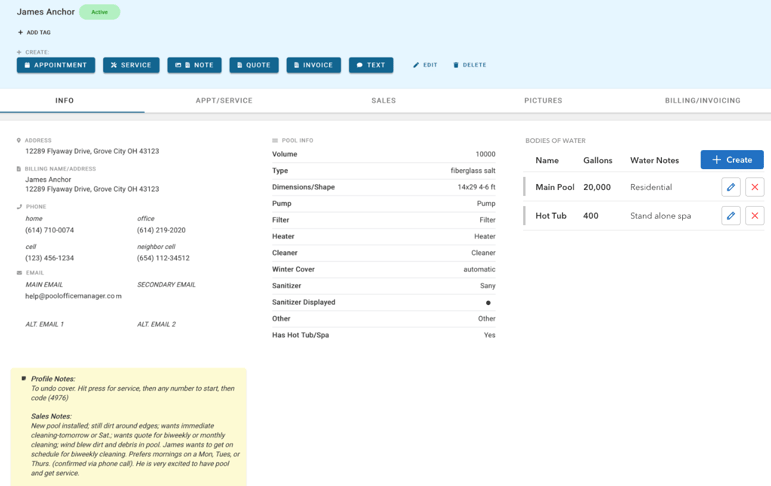
1. Unified Customer Profiles Every customer’s details—contact info, pool specs, past jobs, photos, communication logs, payment preferences, and recurring plans—are accessible in seconds. No more flipping through folders, searching emails, or relying on staff memory.
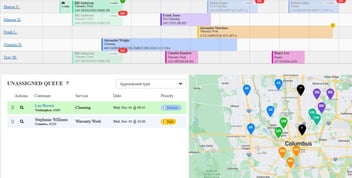
2. Smart Scheduling and Dispatch A visual calendar lets office staff assign and adjust jobs with drag-and-drop simplicity. Recurring appointments, one-off emergencies, and seasonal visits are tracked automatically. Field techs get mobile job sheets, directions, updates, and customer notes in real time.
3. Real-Time Field Communication Field and office sync instantly: photos, notes, chemical readings, and job statuses update to the customer profile. Office staff can answer client questions and invoice faster, without waiting for end-of-day paperwork.
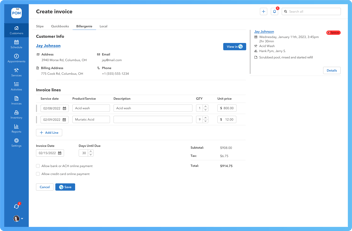
4. Automated Billing and Payments Generate and email invoices, enable online payments, and automate reminders. The best platforms integrate with QuickBooks, Stripe, or similar for seamless accounting.
5. Inventory & Chemical Tracking Log which chemicals or parts are used at each visit, alert staff to low stock, and automatically update both service history and inventory levels.
6. Sales & Marketing Tools Track leads and opportunities, automate quotes, and trigger follow-ups for new installs, upgrades, or regular maintenance packages.
7. Reporting, Dashboards, and KPIs See trends: most profitable clients, types of jobs, seasonal demand, technician performance, and opportunities for upselling or winning back lost clients.
How CRM Powers Every Stage of the Pool Service Customer Lifecycle
Lead Capture & Sales
- Website forms, phone inquiries, and marketing campaigns flow straight into the CRM, ensuring every opportunity is tracked.
- Sales modules let you send quotes or proposals, set follow-up reminders, and record reasons for lost or delayed deals.
Onboarding and Job Management
- No details get lost: the CRM assigns jobs, syncs with calendars, sends reminders to customers, and creates digital job packets for the tech in the field.
- All job notes, photos, and chemical dosages get logged automatically.
Service/Fulfillment
- Techs check in/out, upload service details, and troubleshoot common issues—all from their mobile device.
- Customers receive instant digital job reports, boosting perceived professionalism and trust.
Billing and Repeat Business
- After every completed job, the CRM can send an invoice and payment request, log payments, and start the next round of follow-ups or seasonal offers.
- Built-in workflows enable reminders for filter replacements, warranty expiration, or new offers.
Retention and Upsell
- Track all customer touches, ensure no one “falls through the cracks,” automate post-job surveys, and reach out with special offers based on service history and pool type.
- Run targeted seasonal campaigns and track success rates in real time.
Real-World Benefits: What CRM Changes for Pool Businesses
1. Stop Losing Revenue to “Missed Opportunities” With all prospect and client data in one place, your office can identify overdue jobs, pending estimates, lost leads, and up-sell opportunities at a glance. Never let a sales opportunity or seasonal service pass by unnoticed.
2. Save Hours Every Week Automate appointment reminders, billing, inventory re-orders, and job reporting. Office managers report saving 10+ hours a week by eliminating manual admin.
3. Reduce Costly Errors and Disputes Centralize all communication, GPS-tracked job status, and job photos. No more he-said, she-said disputes or lost paper logs when addressing client questions or warranty claims.
4. Empower Techs and Office Staff Techs arrive at jobs with complete client/service histories, increasing first-visit success rates and reducing callbacks. Stressed-out office employees experience fewer interruptions and last-minute emergencies.
5. Boost Referrals and Reviews Customers who receive timely updates, digital job reports, and post-service follow-ups are more likely to leave positive reviews and refer friends—built-in features in modern CRM platforms.
What to Look For in Pool Company CRM Software
| Feature | Must Have (✓) | Nice to Have |
| Customer Profiles | ✓ | |
| Automated Scheduling | ✓ | Map-based routing |
| Field Mobile App | ✓ | Offline support |
| Recurring Billing | ✓ | ACH/payment plans |
| Inventory Tracking | ✓ | Barcode scanning |
| Communication Logs | ✓ | SMS/email automation |
| Lead Management | ✓ | Sales pipelines |
| QuickBooks/Payment Integration | ✓ | Multi-software sync |
| Analytics & Dashboards | ✓ | Custom KPIs |
| Post-Service Feedback | Surveys/review links |
Pro tip: Test-drive these features via a demo to see which ones fit your workflow.
Popular CRM Software Options for Pool Companies (2025)
Pool Office Manager:
Dedicated to pool businesses with robust customer and route-specific features, two-way QuickBooks sync, unlimited customers and photos, and flexible pricing.
Jobber:
Known for its user-friendly design, job scheduling, and mobile app.
ServiceTitan:
Full-featured field management and CRM for larger companies and franchises.
Builder Prime & Poologics:
Solutions geared toward pool builders and contractors with deep project management capabilities.
Housecall Pro, FieldPulse, WorkWave:
All-in-one platforms with CRM modules, route optimization, and strong mobile tools.
Implementation: Rolling Out CRM in Your Business
Step 1: Set Clear Objectives Define what you want your CRM to achieve: faster scheduling? Fewer missed follow-ups? Improved customer communication?
Step 2: Prepare and Clean Data Gather all client, job, and contact data. Organize, clean for duplicates or missed info, and import into your new CRM.
Step 3: Start with Core Features Don’t attempt full customization from day one. Enable customer management, job scheduling, and invoicing first. Expand to inventory and marketing tools after your team is comfortable.
Step 4: Train and Onboard Team Schedule training for both office and field staff. Designate a “CRM Champion” inside your business for ongoing support.
Step 5: Refine and Optimize Solicit employee feedback. Adjust workflows, add automations, and use analytics to uncover new efficiency and sales opportunities.
Common Questions (and Answers)
How secure is CRM data?
Modern CRM software uses encrypted, cloud-based storage with data backups and strict permission controls. Always confirm your provider’s security measures.
Will CRM work for a small pool company?
Yes—today’s solutions scale from solo operators up to franchise teams, typically with no per-customer limit and flexible pricing.
How much does a pool company CRM cost?
Plans start from $30/month for basic features, up to $150+ for enterprise tools. Most offer free trials or demos to ensure the fit.
Can CRM improve field team performance?
Absolutely—techs armed with mobile CRM access complete more jobs per day, finish “first-time right” more often, and report higher job satisfaction.
Best Practices: Maximizing CRM Value
- Mandate CRM Usage: Make CRM the source of truth for client info, jobs, and billing. Reward techs for diligent note-taking and photo uploads.
- Automate Recurring Workflows: Seasonal campaigns, payment reminders, and post-service surveys should trigger automatically.
- Review Customer KPIs: Track response rates, average job value, and unsold estimates for targeted follow-up and marketing.
- Integrate with Other Tools: Use CRM integrations (QuickBooks, marketing platforms, mapping) for a frictionless workflow.
- Refine Based on Feedback: Revisit automations and dashboards quarterly, adjusting for evolving needs and team insights.
Conclusion:
CRM—From Cost to Competitive Advantage Adopting a modern CRM is the single most impactful step a pool business can take in 2025. CRM empowers your company to move faster, deliver better client service, and grow in a crowded market—without scaling up your admin workload. Whether streamlining sales and scheduling, securing more repeat business, or boosting team accountability, a pool-specific CRM pays dividends in both direct profit and peace of mind. Curious how leading pool companies are using CRM to dominate their markets? [Watch a Demo] now and take the first step toward a smarter, more profitable, and less stressful future.