
In this post
Get the latest insights delivered to your inbox
Winterization season is one of the biggest opportunities—and risks—for a pool service company. Done right, it protects your customers’ pools, showcases your expertise, and sets up profitable work for the next season. Done poorly, it leads to cracked pipes, angry calls in spring, and lost accounts.
The difference usually comes down to process: whether your techs follow a consistent winterizing pool guide and whether your business uses software to manage the rush without dropping details.
This guide lays out top winterization tips specifically for pool service companies, not homeowners. It focuses on what needs to happen at the pool and what needs to happen in your business behind the scenes. It also shows how specialized pool software can help you standardize your checklist, document work, and turn each winterization visit into a chance to upsell and retain customers—all without adding more paperwork.
1. Standardize Your Winterization Checklist Across the Team
The first step to stress‑free winterization is consistency. If each technician “does it their own way,” you risk uneven quality and missed steps.
Core checklist elements to standardize
- Pre‑visit checks
- Confirm address, gate codes, and access.
- Review notes from previous seasons (freeze issues, leaks, equipment age).
- Water chemistry prep
- Balance pH and alkalinity.
- Adjust calcium hardness as needed.
- Add winter algaecide or sanitizer as part of your program.
- Equipment and plumbing
- Backwash and clean the filter.
- Blow out and plug lines (skimmers, returns, main drain, cleaner lines) according to your regional practices.
- Drain pumps, heaters, and other components that can freeze.
- Cover and safety
- Inspect, install, and tension safety or solid covers.
- Check ladders, handrails, and diving boards for off‑season safety/storage needs.
How software helps
- Turn your winterizing pool guide into a digital checklist that every tech follows on their mobile device.
- Make certain fields required (like key drain, plug, and line checks) so critical steps can’t be skipped.
- Keep the same checklist for all techs so training and quality control are easier.
A standardized digital checklist reduces the chance that a rushed visit leads to a costly spring problem.
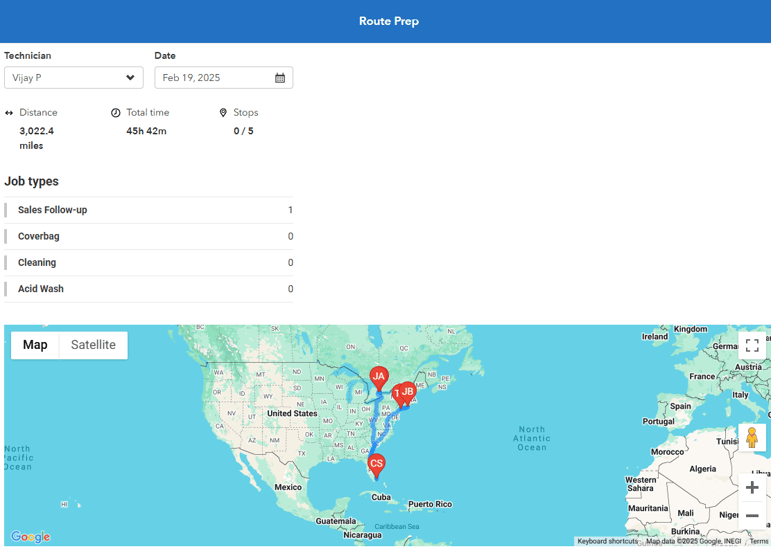
2. Use Software to Pre‑Plan and Batch Winterization Routes
Winterization work is highly seasonal and compresses into a few weeks. Good route planning is essential.
Route planning tips
- Group pools by geography first, not by “who called first.”
- Assign specific days or weeks to specific neighborhoods.
- Reserve flex days for weather delays or high‑complexity pools.
What software adds
- Visual map of all winterization customers so you can create tight, fuel‑efficient routes.
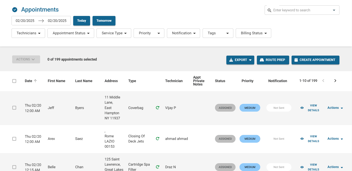
- Drag‑and‑drop rescheduling when weather or access issues arise, with automatic updates to techs.
- The ability to mark certain pools “priority” (for example, complex plumbing or VIP clients) so they get premium slots.
Planning winterization with a software‑backed schedule means you can handle more pools with less drive time and fewer mistakes.
3. Document Equipment and Plumbing Conditions Thoroughly
Winterization is the last time you see a pool before freezing temps. It’s the best moment to document equipment condition and plumbing risks.
What to document
- Visible cracks or corrosion on pumps, filters, heaters, and valves.
- Old or failing seals, unions, and gaskets.
- Previous freeze damage repairs and any vulnerable areas.
- Deck drains, autofills, and features that need special attention.
Why documentation matters
- Protects your company if damage occurs later due to pre‑existing issues.
- Gives you a clear “before” snapshot for spring openings.
- Provides a list of upgrade/repair opportunities to discuss with customers.
How software helps
- Techs can snap photos and attach them directly to the job and customer record.
- Notes live alongside those images, so office staff can create accurate quotes later.
- History is easy to pull up next season, making you look organized and on top of things.
This turns a quick visual check into a long‑term asset for both safety and future sales.
4. Make Water Chemistry Part of Your Winter Protection Plan
Some companies underplay chemistry at closing, focusing mainly on blowing lines and covers. Chemistry issues over winter can lead to stains, scaling, and rough surfaces that cost time and reputation.
Chemistry best practices
- Adjust pH and total alkalinity into acceptable ranges to minimize corrosion or scaling.
- Check and set calcium hardness within your preferred band to avoid etching or scale.
- Use an appropriate winterizing shock or sanitizer program.
- Add winter algaecide suited to your region and expected temperature swings.
Software advantages
- Store target winter chemistry ranges in your digital checklist so techs know what to aim for.
- Record readings and products added at closing for each client, giving a baseline for spring openings.
- Use historical logs to troubleshoot if a pool opens with unexpected staining or algae.
Consistent chemistry logging via software reduces guesswork later and supports your recommendations if customers question outcomes.
5. Turn Every Winterization Visit into a Spring Upsell Opportunity
Winterization is not only about protecting the pool today—it’s also about setting up work for next season.
Upsell and planning ideas
- Suggest equipment upgrades (variable‑speed pumps, heaters, automation) that can be scheduled in the off‑season.
- Propose filter media replacements (sand, cartridges, DE grids) before next season’s rush.
- Offer spring opening packages at a preferred rate for those who commit during winterization.
- Identify neglected pools that would benefit from a start‑of‑season intensive clean.
Role of software
- Tag each customer with recommended upgrades or services during the winterization visit.
- Create follow‑up tasks or reminders for the office to reach out with quotes.
- Track which customers sign up for early booking of openings, so your spring schedule fills with high‑value work first.
By capturing these opportunities in software instead of on sticky notes, you build a predictable pipeline of spring and off‑season revenue.
6. Communicate Clearly with Customers Before and After Winterization
Good communication reduces confusion, callbacks, and cancellations.
Before winterization
- Send reminders explaining:
- What winterization includes.
- Any prep customers must do (e.g., ensure power/water access, pets secured).
- How pricing works and what counts as “extra.”
After winterization
- Provide a brief summary of:
- What was done.
- Any issues found or risks observed.
- What to expect over the winter.
- Recommended upgrades or spring plans.
How software supports this
- Automated reminder emails or texts tied to scheduled winterization dates.
- Auto‑generated service reports from the digital checklist and field notes.
- Consistent language and branding across all customers, making your company look polished and reliable.
Clear, software‑assisted communication makes your business easier to work with, which directly supports retention and referrals.
7. Use Digital Checklists to Train New or Seasonal Techs
Winterization often coincides with temporary staff changes: some techs leave, new ones join, or routes get reassigned. This can be risky if knowledge lives only in experienced techs’ heads.
Training challenges
- New techs may not know local freeze patterns and problem areas.
- Important steps can be overlooked under time pressure.
- Inconsistent approaches lead to inconsistent results.
Digital checklist benefits
- Every tech sees the same step‑by‑step process inside the app.
- Notes from previous seasons at each pool appear automatically, giving context.
- Supervisors can review completed checklists to confirm quality and spot training needs.
Instead of pairing new techs with veterans for every job, you can rely on software to guide and document their work while you focus training where it’s truly needed.
8. Protect Your Business with Detailed Records
If something goes wrong over winter—a burst pipe, cracked heater, or damaged cover—customers may look to you for answers. Detailed, timestamped records are your best defense.
What to record
- Date and time of winterization.
- Weather conditions if relevant (early freeze, storm damage risk).
- Exactly which lines were blown and plugged.
- Equipment settings left at shutdown.
- Any customer‑specific instructions followed (for example, “customer insisted on leaving heater active until later date”).
Why software is critical
- Digital records are easy to search and retrieve, even months later.
- Photos and notes linked to each job show the condition you left the pool in.
- Consistent documentation across your team strengthens your position if disputes arise.
Good records also support warranty claims and help you diagnose recurring problems from year to year.
9. Build a Seasonal Workflow in Software, Not Just on Paper
Winterization is part of a larger seasonal cycle. The more you integrate it into your overall workflow, the smoother each year becomes.
Seasonal workflow elements
- Fall: schedule and complete winterization with documented steps and upsell notes.
- Winter: follow up on off‑season upgrades and maintenance projects.
- Late winter/early spring: use software tags to invite winterization customers to pre‑book openings.
- Spring: execute openings with reference to previous winterization data.
Software lets you:
- Tag customers by season (winterized, ready for spring invite, off‑season project candidate).
- Run simple lists and campaigns from within your system instead of exporting and manipulating spreadsheets.
- See the full customer journey across seasons, so you can refine offerings each year.
This turns winterization from a one‑time service into a strategic touchpoint in a repeatable annual plan.
10. Monitor Metrics to Improve Winterization Each Year
To get better each season, track a few key numbers:
- Number of winterizations completed and average revenue per job.
- Percentage of winterization customers who book spring openings with you.
- Number of winterization‑related callbacks or issues in spring.
- Off‑season upgrade revenue tied back to winterization findings.
With the right software, these metrics are easier to pull because:
- Jobs, invoices, and tags all live in one system.
- You can filter by job type (“winterization,” “opening,” “heater upgrade”) and time period.
- You can test changes (new checklist steps, different upsell offers) and see their impact next year.
Over time, your winterizing pool guide evolves from experience plus guesswork into experience plus solid data.
Bringing It All Together (and How Software Helps You Get There)
Top winterization performance is not just about knowing the right steps at the pool. It is about:
- Having a consistent, detailed checklist.
- Planning efficient routes and schedules for a short, busy season.
- Documenting equipment, chemistry, and plumbing in ways that protect your business and support upsells.
- Communicating clearly with customers before and after visits.
- Turning each closing into an opportunity for future work and loyalty.
Trying to coordinate all of this with paper forms, personal phones, and spreadsheets makes winterization harder than it needs to be. Specialized pool service software gives you:
- Digital, standardized winterization checklists in the field.
- Route planning and batch scheduling tailored to your territory.
- Photo, note, and chemistry logging attached directly to each pool.
- Automated reports, reminders, and follow‑up tasks.
- Seasonal tagging and metrics to refine your strategy year after year.
Instead of surviving winterization season, you can use it as a disciplined, profitable part of your annual business cycle.
If you want your next winterization season to feel more organized, more profitable, and less stressful, consider taking a short demo of a pool‑focused software platform. Seeing your winterization checklist, routes, and documentation inside a real system will quickly show whether it can help you turn seasonal chaos into a repeatable advantage for your company—and make “Start free trial” a smart move rather than just another item on your to‑do list.
.png?width=352&name=umbrella-chair-around-beautiful-luxury-swimming-pool%20(1).png)