A year of updates, in about two minutes. Everything on this page is already in your account, so there's nothing to install.
What's New in Pool Office Manager
Watch: what's new, in about two minutes
Schedule
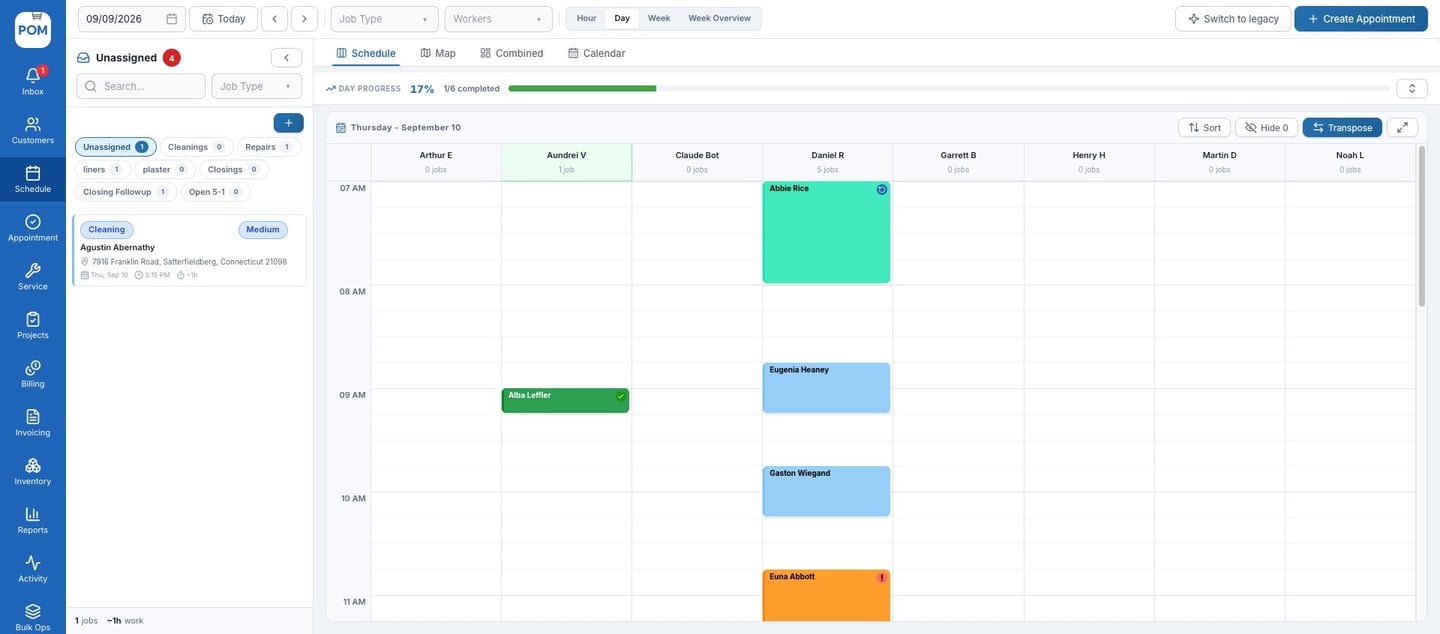
Click Transpose on the schedule for a calendar view: each tech gets a column and the day runs down the page, like Google Calendar. You can also create your own unassigned queues, like Repairs or Green Pools, so waiting jobs stay sorted until you drag them onto a tech.
Customer profiles
Profiles were redesigned with tabs and quick actions. The Media tab keeps every photo from the pool, and now it holds videos too. On the Documents tab you can upload files like PDFs to the customer.
Notifications and alerts
Techs get a push notification when their day changes, and the office gets one inbox for everything that needs attention. You can build your own alerts too. For example, get notified when a tech logs chlorine below 1, at high priority, in the app or by email.
Usage reports
See exactly what went into your pools: by item, by customer, and what it all cost.
Invoices and QuickBooks
Use the notes your tech wrote in the field as the invoice line description, or write your own. The QuickBooks sync has been optimized to sync faster and more reliably.
WHAT CHANGED
The highlights
Calendar view
Transpose the schedule: one column per tech, the day running down the page.
Your own queues
Create unassigned queues like Repairs or Green Pools, then drag jobs onto a tech.
Videos and PDFs
Videos on the Media tab, and PDFs and other files on the Documents tab.
Custom alerts
Get notified when a reading crosses your line, like chlorine below 1.
Usage reports
What went into your pools, by item, by customer, and by cost.
Field notes on invoices
Use the tech's notes as the line description, with a faster QuickBooks sync.
STEP-BY-STEP GUIDES
Need a hand with any of it?
Every feature on this page has a step-by-step guide in the POM Support knowledge base. Or call us at 614-710-0074, or email help@poolofficemanager.com.
Quotes and projects
Quotes have a new details page. When a customer approves more than one service, a project keeps all of the work in one place. You can also tag a teammate in a note: type @, pick a name, and they get a notification.
Redesigned customer emails
The emails your customers receive were redesigned too, including the service report, with photos and readings.
Questions about what's new?
Call 614-710-0074 or email help@poolofficemanager.com.