In this post
Get the latest insights delivered to your inbox
For growing pool service companies, invoicing is often the hidden bottleneck. Work gets done in the field, but billing happens days or weeks later—after route sheets are collected, handwriting is decoded, and notes are keyed into accounting software.
Along the way, invoices are missed, numbers are wrong, and owners spend nights catching up instead of planning ahead.
Automated invoicing in Pool Office Manager (POM) changes that equation. By connecting job completion directly to billing, pool pros cut admin time, reduce errors, and get paid faster, with clear numbers to prove it. This article walks through realistic examples and metrics that mirror what many pool companies report after moving to automated invoicing, and explains why clients say they “could never go back” once they see the difference.
The invoicing problem most pool pros quietly struggle with
Before automation, invoicing usually looks like this:
- Techs turn in paper route sheets or text what they did.
- The office spends hours each week typing visit details into spreadsheets or accounting tools.
- Small extras—shock treatments, minor repairs, extra cleanup time—get lost or forgotten.
- Invoices are batched at the end of the week or month, so cash is always a little behind.
- When customers question a bill, there is no clear, consolidated record tying each charge to specific work.
Across dozens or hundreds of accounts, a few patterns emerge:
- 3–10% of jobs never get billed at all.
- Days‑to‑payment stretch out because invoices go out late.
- The owner has no quick way to see which services or routes are actually driving profit.
POM clients move away from this pattern by embedding invoicing into the flow of work, not treating it as a separate, manual project.
How automated invoicing works inside Pool Office Manager
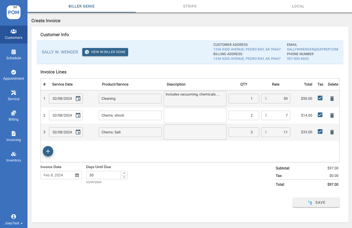
Automated invoicing in POM rests on a simple but powerful idea: if it is on the schedule and completed in the field, it is ready to bill.
The basic workflow
- Schedule the work
- Weekly visits, openings, closings, and one‑off jobs are created on the calendar with linked service items and prices.
- Weekly visits, openings, closings, and one‑off jobs are created on the calendar with linked service items and prices.
- Complete the job in the field
- Techs see the job on their mobile app, do the work, log readings/notes/photos, and mark it complete.
- Techs see the job on their mobile app, do the work, log readings/notes/photos, and mark it complete.
- Job flows into billing
- Completed jobs move into a billing queue.
- For recurring customers, POM can automatically group visits into a single periodic invoice.
- Invoice review, then send
- The office quickly reviews pending invoices, adjusts as needed, and sends them—either directly or into an accounting system like QuickBooks.
- The office quickly reviews pending invoices, adjusts as needed, and sends them—either directly or into an accounting system like QuickBooks.
- Payment and reconciliation
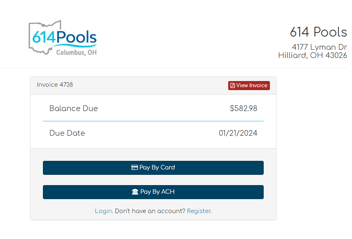
- Customers receive professional invoices, often with online payment links.
- Once paid, records update without re‑entering all the details.
The result is a straight line from work performed to money collected, with minimal human copying in between.
Case snapshot: A 200‑account pool company before and after POM
Consider a realistic mid‑size pool business:
- 200 regular residential accounts
- 3 commercial pools
- 3–4 technicians on weekly routes
- Mix of weekly and bi‑weekly service, plus seasonal openings/closings
Before automated invoicing
- Office spent 8–10 hours per week building invoices from paper and texts.
- Invoices went out once every 2 weeks.
- Estimated 5% of jobs never billed (missed notes, lost sheets, small extras).
- Average days‑to‑payment: 21–25 days.
After automated invoicing with POM
Within a few months of switching:
- Office invoicing time dropped to about 2–3 hours per week (mostly review).
- Invoices for many customers went out weekly, with others on monthly cycles.
- Missed jobs fell to near zero because every completed job appeared in the billing queue automatically.
- Days‑to‑payment tightened to around 10–14 days, thanks to faster sending and clear detail.
Even if each weekly visit averaged a modest fee, that 5% recovery on previously missed billing meaningfully increased annual revenue—without doing a single extra stop.
Metric 1: Time saved on invoicing admin
Across client stories, one of the clearest metrics is admin hours saved.
What companies often report
- Pre‑POM: 8–15 hours/week on invoicing (owner + office staff).
- Gathering route sheets
- Manually entering line items
- Fixing typos
- Double‑checking totals
- With POM automated invoicing: 2–4 hours/week.
- Reviewing auto‑generated invoice queues
- Handling special cases or adjustments
That is a typical savings of 6–10 hours every week that can be reallocated to customer service, training, or sales. Over a 30‑week busy season, that is 180–300 hours—effectively several additional weeks of full‑time office capacity freed up.
Clients consistently say this alone makes it hard to imagine going back to manual processes.
Metric 2: Capturing 100% of billable work
Automated invoicing dramatically reduces the “we forgot to bill that” problem.
How jobs get lost without automation
- Extra visits squeezed in at the end of the day.
- Chemical or part charges added on‑site but never written down clearly.
- Techs covering each other’s stops without updating the paper trail.
Even a small, conservative miss rate of 3–5% adds up. In a 200‑account company:
- 200 accounts × ~4 visits/month × 8 prime months = 6,400 visits/year.
- At a 5% miss rate, 320 visits go unbilled.
- At a $75 average revenue per visit, that is $24,000 per year left on the table.
With POM:
- Any scheduled job that is marked complete appears in the billing queue.
- Unscheduled emergency visits can be created on the fly and linked to the customer, ensuring they are captured.
Most companies see the missed‑billing percentage drop close to zero. Recovering even half of that hypothetical $24,000 pays for the system many times over.
Metric 3: Faster cash collection (days‑to‑payment)
Another metric where clients see clear movement is days‑to‑payment.
Why manual invoicing slows cash flow
- Invoices are delayed because they depend on admin availability.
- Errors and omissions trigger customer questions and disputes.
- Lack of itemization makes some customers hesitant to pay quickly.
With automated invoicing in POM:
- Many invoices go out the same week work is done.
- Each line item can be clearly tied to a job and, if needed, to logged notes or photos.
- Customers can often pay online using integrated payment options.
Businesses frequently see average days‑to‑payment drop by a week or more. Over time, this smoother cash flow:
- Reduces the need to dip into credit lines.
- Improves predictability for payroll and inventory purchases.
- Gives owners more confidence to invest in growth.
Metric 4: Reduction in billing errors and disputes
Clients also notice fewer “Why is this bill so high?” conversations after moving to POM.
Sources of common billing disputes
- Incorrect quantities or wrong service codes entered by hand.
- Services billed that do not match the visit date or description the customer remembers.
- Customers forgetting about extra work that was never properly documented.
With POM:
- Line items are driven directly by scheduled service and job completion, reducing manual entry.
- Notes and photos from the job are available to support any charge.
- Recurring plans and seasonal packages appear consistently month to month.
While exact percentages vary, many companies report a meaningful drop in billing‑related complaints—sometimes cutting them in half—once invoices and job histories are clearly aligned.
What clients actually say they like most
When pool pros talk about automated invoicing with POM, their positive feedback often falls into a few themes:
1. “I finally trust that everything is billed.”
Owners no longer lie awake wondering which jobs they forgot to invoice. If a job is on the schedule and marked complete, it goes into the billing process. That peace of mind is hard to quantify but easy to feel.
2. “My evenings are mine again.”
Owners and office managers frequently mention getting their nights back. Instead of catching up on paperwork after dinner, they go home knowing the bulk of invoicing work is already taken care of by the system.
3. “My staff can handle more without burning out.”
With less time spent on low‑value data entry and chasing missing information, office staff have bandwidth for higher‑value tasks: handling complex customer questions, organizing routes, and supporting growth.
4. “Customers see us as more professional.”
Clear, timely invoices—linked to digital service reports—make the company look organized and trustworthy. That professional impression supports retention and helps justify prices.
How automated invoicing supports growth
Automated invoicing is not just about saving time today; it also makes growth possible without a matching spike in admin workload.
Example growth path
- A company at 150 accounts, 2 techs, and manual invoicing hits its ceiling.
- With POM, the same office setup can manage 250–300 accounts and 4–5 techs.
- As they grow, invoicing time increases only modestly because automation scales with volume.
Without automated invoicing, every new route adds hours of paperwork. With it, new routes add mostly revenue.
This is why many POM users talk about growing faster than they expected once their back office was under control.
Implementation tips from successful clients
Pool pros who are happiest with automated invoicing in POM tend to follow a few best practices:
1. Define standards for how jobs are created
- Ensure every visit type has the correct pricing and service codes attached.
- Decide which extras (chemicals, minor repairs) should be captured as add‑ons directly from the job.
This keeps invoices clean and predictable.
2. Train techs on why completion steps matter
- Explain that marking jobs complete and logging simple details is how the company gets paid accurately—and how their work is reflected.
- Show how their job history appears in the office view and on invoices.
When techs see their actions directly affecting billing and customer satisfaction, they are more consistent.
3. Start with a hybrid review period
- For the first month, compare automated invoice queues with manual expectations to build confidence.
- Use that time to tweak job templates, pricing, and grouping rules.
Once the team trusts the process, you can lean fully into automation.
Why Pool Office Manager is a strong choice for automated invoicing
There are many ways to send an invoice. What sets POM apart for pool pros is how deeply invoicing is connected to the realities of pool service:
- Pool‑specific job types and templates make it easy to map real work to billable items.
- Route‑based scheduling ensures that everything on the truck’s list can be turned into clean billing, with minimal extra clicks.
- Field logging (readings, notes, photos) lives with the job, giving context to every charge.
- Accounting integration reduces or removes double entry, so your financials stay accurate without extra effort.
Compared with piecing together separate apps for scheduling, field notes, and invoicing, POM’s integrated approach gives pool businesses a simpler, more reliable way to get from “work done” to “money in the bank.”
A practical next step: See automated invoicing on your own numbers
If your current invoicing process:
- Eats hours every week,
- Still lets billable work slip through the cracks,
- Or creates anxiety every time you close a month,
then automated invoicing with Pool Office Manager is worth a serious look.
The best way to evaluate it is to:
- Take one or two weeks of recent work.
- Walk through how those visits would appear, be completed, and be billed inside POM during a live demo.
- Compare the steps, time, and error risk to your current process.
If you can clearly see where those 6–10 hours per week would come back to you—and how much more confidently you would bill every job—then clicking “Get Demo” is more than an experiment. It is the first step toward a calmer, more profitable, and more professional pool service business built on automated invoicing that your clients (and your team) will actually love.