In this post
Get the latest insights delivered to your inbox
Running a small pool service company is a constant balancing act. You want to grow, take on more routes, and deliver a great experience—but you also need to keep overhead low and avoid adding complicated systems that slow you down.
That’s where the right pool service software comes in. The best software for small pool businesses gives you big‑company tools without big‑company complexity or cost.
In this guide, you’ll compare what small pool companies actually need from software, see how popular options stack up, and learn what to look for so you end up with a system that helps you grow instead of getting in your way. Along the way, you’ll see why choosing a platform built specifically for pool pros is often the smartest move.
What Small Pool Companies Really Need from Software
Before diving into tools, it helps to get clear on your real priorities. Most small pool businesses share a similar list:
- Keep scheduling simple and accurate (no missed visits).
- Cut down on paperwork and duplicate data entry.
- Make billing and payments smoother and faster.
- Keep all customer info and history in one place.
- Help techs in the field stay organized and accountable.
- Stay affordable and easy to learn for a small team.
If software doesn’t make those things better, it’s just another expense. The goal is not to have software—it’s to do more work, with less effort and fewer headaches.
Key Features to Look for (Small-Business-Friendly)
When evaluating the best software for a small pool company, focus on these essentials:
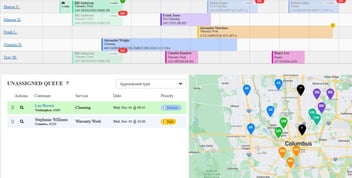
- Easy, visual scheduling
Drag‑and‑drop calendars, recurring jobs, and quick ways to move or copy appointments. - Route overview
Let you see tech schedules and daily routes at a glance so you can plan efficiently. - Customer database (CRM)
Store contact info, gate codes, notes, photos, and service history in one place. - Mobile app for techs
Give techs their schedule, job details, checklists, photos, and basic logging on their phones. - Basic chemical logging or calculators
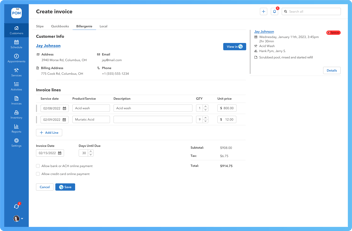
At minimum, record test results and what chemicals were added. Even better if there’s a calculator. - Invoicing and payments
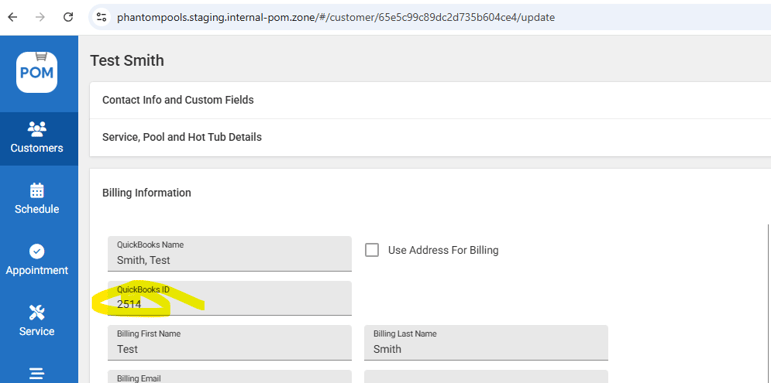
Create professional invoices quickly, send digitally, and accept online payments. - Integrations with accounting (like QuickBooks)
Reduce double entry and keep your books clean. - Simple reporting
Ability to see which customers are profitable, which services take the longest, and outstanding invoices.
It’s easy to get distracted by niche extras. If you’re small or just starting to grow, getting these basics right matters more than any advanced feature.
Types of Software Options Small Pool Companies Consider
When you start shopping, you usually run into three types of software:
- General field service software
These tools are built for many trades: HVAC, lawn care, electrical, and pool service. They’re flexible and often entry‑priced, but may lack deeper pool‑specific features like chemical modules. - Pool‑specific software platforms
Built from the ground up for pool service. They typically include scheduling, route tools, chemical tracking, and pool‑focused workflows. These often fit your day‑to‑day reality best. - “Patchwork” of generic apps
Some small companies piece together Google Calendar, spreadsheets, invoicing apps, and messaging. This can work for a while, but can become error‑prone and harder to manage as you grow.
For a small pool business that plans to grow, moving from a patchwork model to a pool‑specific platform usually brings the greatest benefits.
Comparison: What Matters Most for Small Pool Service Teams
Here are the main comparison points that matter for smaller operators:
- Ease of setup
Can you import your customer list and get rolling quickly, or does it require a long, complex implementation? - Learning curve
Will your techs understand the home screen without needing a thick manual? - “Owner view” vs. “tech view”
Does the software give you management insights (cash flow, workload, outstanding invoices) while staying simple for techs on mobile? - Pricing that grows with you
Does it feel reasonable for 1–3 techs and still make sense if you add a few more routes? - Pool-specific workflows
Does it handle things like recurring weekly service, seasonal openings/closings, chemical records, and photo‑rich service reports?
How Software Changes a Small Pool Company’s Day
To see why this matters, imagine two small pool companies with three techs and around 150–200 recurring stops.
Company A: Manual / basic apps
- Office spends hours each week on manual scheduling in spreadsheets.
- Techs text or call for the day’s schedule and changes.
- Customer notes are scattered across paper, text threads, and memory.
- Invoices are created at the end of the week or month, sometimes later.
- Owner struggles to see who still owes money or which routes are overloaded.
Company B: Good pool service software
- Schedules are set up once, with recurring jobs handled automatically.
- Techs open a mobile app each morning and see their route, directions, and notes.
- Chemical readings and photos are logged during each visit.
- At the end of each job or day, invoices are triggered automatically.
- Owner sees a daily dashboard of jobs completed, revenue, and outstanding invoices.
Same size business—very different feel. The second scenario is what the better pool service software makes possible.
What to Ask When Comparing Specific Products
When you look at options, ask vendors (and yourself) questions like:
- For my size, how long should setup realistically take?
- Could I run all my daily work inside this one tool?
- How many clicks does it take for a tech to complete a job?
- What do digital service reports look like for my customers?
- How does the software help me stay on top of late payers?
- What happens if my team grows—do I need to switch systems?
If a tool can’t answer these in a straightforward, confident way, it probably won’t be the best long‑term fit.
Why Pool-Specific Software Often Wins for Small Companies
Software built specifically for pool companies tends to:
- Match your vocabulary (routes, stops, visits, readings, dosages) instead of generic “work orders.”
- Handle weekly, bi‑weekly, and monthly patterns naturally.
- Make chemical logging and reporting a built‑in part of each visit.
- Support seasonal patterns (openings, closings, winter checks).
- Provide service reports that make sense to pool owners and HOAs.
For a small company, that fit means less time “bending” a general system to match your world—and more time just using it to run your day.
How the Right Software Quietly Helps You Grow
You might not feel the full impact in week one, but over months a good system tends to:
- Prevent revenue from slipping through the cracks (no missed invoices or forgotten add‑ons).
- Make schedule changes and routing smoother as you add more customers.
- Give you data on which services and areas are most profitable.
- Make it easier to hire and onboard new techs, since they can see routes, notes, and checklists in the app instead of relying only on verbal instructions.
Those effects combine over time, helping a small pool business feel less fragile and more predictable.
Subtle Ways to Evaluate “Best Fit” for Your Small Business
When you’re close between two tools, consider:
- Which one feels like it “gets” how pool days actually run?
- Which one would your least tech‑savvy technician be comfortable with?
- Which one gives you the information you personally look for as an owner (for example, daily revenue vs. route load)?
- Which vendor seems genuinely invested in pool companies, not just generic field service?
That “fit” often matters more than one extra feature on a checklist.
Why a Free Trial or Demo Is Worth Your Time
At BOFU, you’re past the “just browsing” stage. The next practical step is usually:
- See the software in action, using scenarios that look like your actual routes and customers.
- Ask to walk through a typical day: scheduling, a few jobs, chemical logging, and invoicing.
- Get your technician(s) to try the mobile app and give honest feedback.
- Confirm the pricing, support, and onboarding options that are right for your size.
A good demo or trial doesn’t just show buttons—it lets you imagine how your own day would run with the software. If, during that demo, you find yourself thinking “this would make my life easier,” that’s a strong signal you’re heading in the right direction.
Conclusion
There’s no one “best” pool service software for every business—but there is a best fit for your small pool company. The right platform will make scheduling clearer, routes tighter, billing smoother, and communication more professional, without burying your team under complexity or cost.
If your current setup feels like it’s holding you back—missed visits, late invoicing, too much time on admin—this is a good moment to see what dedicated pool service software can do. A short, focused trial or demo is usually enough to tell whether a system matches the way you and your techs actually work, and whether it can quietly support the growth you’re aiming for.
From there, you’re only a few steps away from trading reactive, manual days for a more organized, scalable pool business—run with the kind of software that feels like it was built for you.