In this post
Get the latest insights delivered to your inbox
Most pool businesses know they should “track more data,” but few have a clear, practical system for using that data to make better decisions.
The result is familiar: long days, busy routes, decent revenue—but no clear understanding of which customers, services, and routes are truly profitable or where time is being wasted.
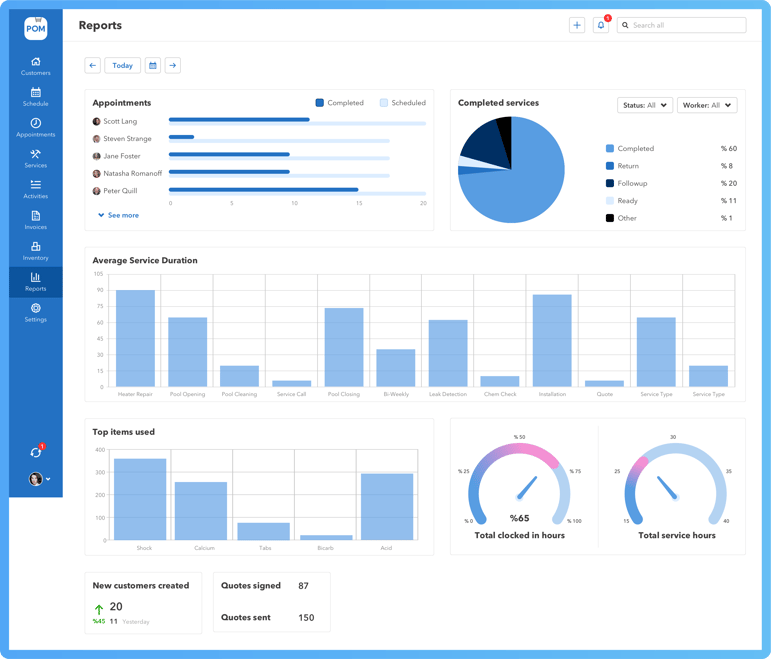
Service reports are the bridge between what happens in the field and the decisions made in the office. When those reports are generated and stored through pool‑specific software like Pool Office Manager (POM), they become a powerful engine for efficiency and growth instead of just “paperwork after a visit.” Service reporting stops being a chore and becomes one of your most valuable business tools.
Why service reports are the foundation of data-driven pool operations
Service reports are more than proof that someone showed up. When done right, they capture:
- What work was performed.
- How long it took.
- What the water chemistry looked like.
- What issues were discovered or resolved.
Without this information in a structured, searchable format, decisions are based on gut feel and memory. That might work at 40 accounts; it falls apart at 140.
Pool Office Manager turns every completed job into a structured record—readings, tasks, notes, photos—that can be searched, filtered, and analyzed. Instead of service reports disappearing into a stack of papers or random PDFs, they live in one organized system tied to customers, routes, and invoices.
What a high-quality service report should include
To support efficiency and better decisions, a report needs more than a checkbox that says “completed.”
Essential elements
- Customer and property details
Name, address, access notes, and pool type—linked to the customer profile so reports are easy to find. - Date, time, and technician
Who was there and when, which supports accountability, scheduling decisions, and training. - Water chemistry readings
Chlorine, pH, alkalinity, calcium, and other relevant tests, captured as numbers—not just “ok.” - Tasks performed
Skimming, brushing, vacuuming, basket cleaning, filter backwash, equipment checks, and any special actions. - Chemicals and materials used
Types and quantities, which tie directly into cost and pricing decisions. - Notes and photos
Issues found, recommendations made, before/after shots for green pools or repairs.
When Pool Office Manager prompts techs with digital checklists and fields, it standardizes these elements so every report contains comparable data. That is what makes true analysis possible.
Turning service reports into route and labor efficiency
Service reports can show you exactly where time goes on your routes—and where efficiency gains are hiding.
Step 1: Measure average time per stop
By looking at timestamps and job history, you can see:
- How long weekly visits actually take on different routes.
- Which pools consistently run over expected time.
With POM, you can compare these patterns across:
- Technicians (is someone unusually fast or slow?).
- Neighborhoods (are some clusters more congested?).
- Service types (are certain visits under‑ or over‑scoped?).
This insight lets you:
- Rebalance routes so each day is realistic.
- Identify stops that require price adjustments or service plan changes.
- Spot training needs when one tech consistently takes longer or triggers more rework.
Step 2: Optimize route design using report data
Service reports also reveal:
- Repeat issues that cause return visits.
- Pools with constant debris, complex access, or equipment quirks.
Using this information, you can:
- Schedule problem pools earlier in the day or assign them to your most experienced techs.
- Create “heavy” and “light” route mixes so no single tech gets overloaded.
Pool Office Manager’s mapping and reporting tools work together here: the map helps you minimize drive time, and the reports tell you which stops are inherently heavier or lighter.
Using service reports to control chemical and material costs
Chemicals quietly eat into margins if not monitored. Service reports provide the data to keep them in check.
Tracking usage patterns
When techs log chemicals in POM:
- You can see usage per stop, per route, and per technician.
- You can identify outlier pools that consume far more chemicals than average.
This leads to smarter actions:
- Recommending equipment upgrades or automation for high‑demand pools.
- Adjusting service frequencies for pools that stay stable longer.
- Coaching techs who consistently over‑dose compared to peers.
Aligning pricing with reality
If service reports show that some pools:
- Require frequent shocking.
- Have chronic algae problems.
- Consistently take more time and chemicals than the rest.
You have the hard evidence needed to:
- Adjust pricing or service plans.
- Offer targeted upgrades (filters, pumps, automation) with clear justification.
By collecting this information automatically through Pool Office Manager, you stop guessing where your chemical budget is going—and start steering it.
Using service reports to reduce callbacks and rework
Callbacks are a double hit: lost time and damaged trust. Service reports help prevent them and resolve them faster when they happen.
Preventing callbacks with better documentation
Clear digital reports:
- Remind techs of unresolved issues noted in previous visits.
- Ensure recommendations are actually communicated to customers and tracked.
- Help spot patterns like recurring cloudy water after heavy use or storms.
When techs use POM to review prior notes and photos before a visit, they arrive better prepared and less likely to miss something important.
Resolving issues faster when customers call
When a customer calls with a complaint:
- You can pull up the last few reports in seconds.
- You see exactly what readings were, what was done, and any notes.
- You can respond with specifics rather than vague assurances.
Often, this alone calms the situation. When a return visit is needed, techs go out with clear context, reducing trial‑and‑error. Over time, fewer callbacks mean more capacity for new revenue.
Service reports as a tool for training and accountability
Data‑rich reports are one of the best training tools you can have.
Coaching technicians with real examples
You can use reports in POM to:
- Compare how different techs handle similar pools.
- Show where a tech skips steps or logs fewer details.
- Highlight good performance—thorough notes, clean water histories, and low callback rates.
Instead of generic feedback, you can sit with a tech and review specific pools, screenshots, and patterns. That kind of targeted coaching improves performance faster than informal verbal reminders.
Setting and monitoring standards
By defining what a complete service report looks like—readings, tasks, notes, and photos—you make expectations clear. Pool Office Manager lets you:
- Require certain fields for completion.
- Quickly scan reports to ensure consistency.
Technicians understand that their work is both physical and informational: they are not just cleaning pools but maintaining the data that keeps the business running smoothly.
Service reports, customer perception, and sales
Service reports are not just internal tools. They are also powerful customer‑facing assets.
Building trust and justifying value
Customers often cannot see the difference between a cheap, quick visit and a thorough, professional one—unless you show them.
When customers receive POM‑generated reports that include:
- Exact readings.
- Tasks completed.
- Photos of their pool or equipment.
They can see:
- That you are consistent.
- That you notice and flag potential issues early.
- That your recommendations are grounded in documented facts.
This makes:
- Price increases easier to explain.
- Upsell conversations more credible (“We’ve logged recurring pressure issues for 3 months; here’s why we recommend a filter service or upgrade.”).
- Referrals more likely because customers feel genuinely cared for.
Supporting online reviews and reputation
When you ask satisfied customers for reviews:
- They are more likely to mention your clear reports and communication.
- Prospects reading those reviews see evidence of professionalism, not just “showed up.”
Pool Office Manager’s reporting features help shape that perception every week, not just when something big happens.
Making reporting fast and painless for techs
None of this works if creating reports is a burden. The advantage of pool‑specific software is that it makes reporting feel like a natural part of the job, not extra work.
How POM streamlines reporting
- Pre‑built visit templates: Techs see only relevant fields for each visit type.
- Mobile‑friendly inputs: Tapping readings and checking boxes is quick.
- Photo integration: Snap and attach photos without switching apps.
- Automatic report generation: Once completed, the system formats and stores the report; techs do not touch PDFs or emails.
Techs quickly realize that good reporting protects them, reduces callbacks, and helps the company run better—which ultimately benefits them too.
Building a data-driven culture in your pool business
The real power of service reports emerges when your entire team starts to think in data‑driven terms.
For owners
- Weekly or monthly reviews of key patterns: time per route, chemical usage, callbacks, and profit per customer.
- Strategic decisions based on trends rather than anecdotes.
For office staff
- Faster responses to customer questions using service histories.
- Fewer manual tasks and better prioritization of the day.
For technicians
- Clear expectations about what “good” service looks like.
- Recognition and rewards based on measurable contributions.
Pool Office Manager becomes the shared reference point: everyone sees the same information, in the same place, and uses it to guide their work.
Practical steps to implement data-driven service reporting with POM
If you want to turn service reports into a real efficiency engine, you can follow a straightforward sequence:
- Define your standard report content
- Decide what readings, tasks, and notes are required for each visit type.
- Configure templates in POM
- Build checklists and input fields that match your standards.
- Train techs on quick, accurate reporting
- Emphasize why it matters and how it protects them.
- Start sending reports to customers
- For at least a subset of visits (weekly plus major work).
- Review data monthly
- Look at time, chemicals, callbacks, and revenue patterns.
- Adjust routes, pricing, and training based on what you see
- Use the reports to back up decisions, not just feelings.
Each step deepens your data, improves decisions, and reinforces the value of Pool Office Manager as your central reporting and operations hub.
Why Pool Office Manager is the right foundation for data-driven growth
Generic tools can store some notes, but Pool Office Manager is built specifically so pool service reports are:
- Easy for techs to complete.
- Rich enough for meaningful analysis.
- Automatically tied to customers, routes, and billing.
That combination allows you to:
- Maximize route efficiency.
- Control chemical and labor costs.
- Reduce callbacks and improve customer satisfaction.
- Base decisions on real numbers instead of guesswork.
If your current “reports” are scattered notes, occasional photos, and memory, you are running a complex field operation without a dashboard. Pool Office Manager gives you that dashboard—and the data to fill it—through everyday service reports.
If you are ready to turn your visits into insights and your insights into profit, starting a Get Free Trial of POM and building your first set of standardized service reports is a practical next move. It is often the moment when pool businesses realize just how much smarter and more efficient their operation can be when every job tells a clear, usable story.