In this post
Get the latest insights delivered to your inbox
For pool service companies, getting paid quickly and accurately is essential for growth and stability. Unfortunately, manual billing—paper stacks, handwritten notes, and endless chasing of late payments—creates endless headaches and stifles cash flow. In 2025, the world's best pool businesses are ditching outdated methods and relying on automated pool service billing software like Pool Office Manager.
This step-by-step guide dives deep into the features, advantages, and real-life ROI of modern automated billing, giving you everything you need to streamline your operations and get paid faster than ever.
Why Automated Billing Is Critical for Pool Service Businesses
Faster Payments & Improved Cash Flow
The top cause of cash flow issues is delayed or missed payments. Automated billing software ensures invoices are generated and sent on time—weekly, monthly, or after each job—without manual effort. Integrated payment portals, automated reminders, and instant reconciliation speed up collections, improving your bottom line.
Reduced Administrative Overhead
Manual invoice creation, recordkeeping, data entry, and reconciliation eat up valuable time and leave room for error. With Pool Office Manager, you can bulk-invoice every customer at once, automate recurring payments, and eliminate paperwork forever.
Seamless Integration With Accounting Platforms
No more double entry or reconciliation headaches. POM integrates instantly with QuickBooks Online for a true 2-way sync of customers, services, invoices, items, payments, and refunds. It also exports to QuickBooks Desktop, so your accountant loves you too.
Improved Client Satisfaction and Professionalism
Clients get timely, automated invoices, friendly reminders, and easy online payment options—including credit card, ACH, and payments saved securely on file. With branded, itemized invoices and post-service reporting, your pool business looks and operates like an elite service company.
Key Features to Look For in Pool Billing Software
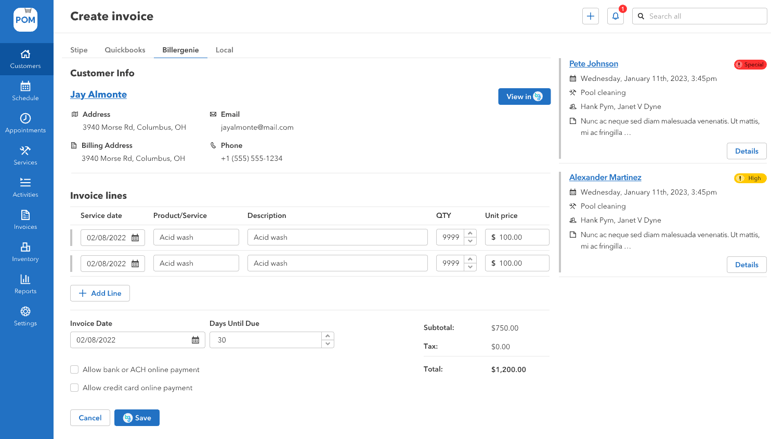
1. Flexible & Customizable Invoicing
- Bulk or single invoice creation for any scheduling frequency: weekly, monthly, or on-demand.
- Set unique billing terms per customer/property.
- Invoice for all service types: recurring maintenance, repairs, specialty work, or chemical charges.
2. Automated Payment Collection
- Store payment methods (credit card, ACH) for easy auto-billing.
- Enable customers to enroll in autopay via their own dashboard.
- Set up automatic retries for failed payments and send reminders.
3. QuickBooks Integration
- Instant two-way sync with QBO: clients, invoices, payments, refunds, and items.
- Export invoices to QuickBooks Desktop when needed. Keep your P&L balanced and simple.
4. Payment Links and Customer Portals
- Send invoices with one-click "pay now" options.
- Branded digital payment portal for clients: view past invoices, update payment methods, enroll in autopay.
- Real-time visibility for both you and your clients.
5. Transparent Fee Structure & Surcharging
- Clearly display taxes, fees, and surcharges (credit card processing fees).
- Automate application of discounts, credits, and recurring charges per client or per service.
6. Reminders & Follow-ups
- Automated reminders for unpaid invoices.
- Email notifications for payment confirmations, receipts, and overdue accounts.
7. Secure, Mobile-Ready Operations
- Complete billing and payments from desktop or mobile.
- Use digital signatures, lock-in rate plans, and instantly access invoices on the go.
How Pool Office Manager Stands Out
Pool Office Manager isn’t just another field service tool—it’s built for the realities of pool service billing:
- Automated, flexible invoicing for any service type
- Bulk-invoice options to invoice entire routes with a click
- Smart integration with QuickBooks Online (instant sync) and Desktop (easy export)
- Partnership with Biller Genie for online customer payment portals
- Customizable surcharges, tax calculation, and credit application
- Secure payment storage, autopay, and retry logic for failed payments
- Branded, professional, digital invoices and receipts
- Free staff onboarding and unlimited US-based support
Step-by-Step: Setting Up Automated Billing in Pool Office Manager
1. Create Branded Invoice Templates Set custom invoice templates for maintenance, repairs, or seasonal work. Include your branding, itemized service descriptions, and required payment terms.
2. Set Up Customer Profiles and Payment Preferences Import clients from QuickBooks, add custom terms, and secure payment methods on file. Specify billing frequency (weekly, monthly, per service) per client.
3. Configure Recurring or One-Time Billing Set up recurring jobs to auto-generate invoices at defined intervals. Create and send invoices on demand for repairs or specialty work.
4. Enable Payment Portals & Auto-Pay Invite customers to register their payment info, view invoice history, and enroll in autopay. Enable instant receipt generation.
5. Sync With QuickBooks Enable the 2-way sync (Online) or export functions (Desktop) so your books, P&L, and reports always match.
6. Automate Reminders and Follow-Ups Activate automated email/SMS reminders for outstanding payments, late invoices, or failed charges.
Real-Life Impact: ROI and Results From Pool Office Manager Users
- Companies report reducing time spent on billing by 50% or more, freeing up hours for service and sales.
- Cash flow increases with a high percentage of invoices paid within 48 hours.
- Customer disputes and follow-up requests drop dramatically thanks to instant access to reporting and invoices.
- Accountants and staff rave about the streamlined reconciliation and reporting.
Frequently Asked Questions
Can I invoice for repairs, chemicals, or specialty services?
Yes. POM lets you create single, bulk, or recurring invoices for any type of service, including custom chemical charges or repair work—all with branded, itemized detail.
Does Pool Office Manager integrate instantly with QuickBooks?
Absolutely. QuickBooks Online connections are instant and bi-directional. QuickBooks Desktop supports batch exports for advanced accounting.
Can customers save cards or set up autopay?
Yes. Each client can register a card or ACH account, view their payment history, and enroll in autopay or instant paid invoices.
Is mobile billing supported?
Yes, you can bill and collect payment in the field or office using any device. Field techs can prompt invoicing immediately upon job completion.
Are processing fees transparent?
Yes, set custom surcharges, display fees, and enable automated fee structures for credit cards (if local regulations allow).
Conclusion:
Ditch the Paper and Get Paid—Fast Automated billing is no longer just a convenience—it's a competitive requirement for pool companies ready to scale. Pool Office Manager’s billing software helps you reduce admin time, impress customers, and get paid fast. Explore features, see real user wins, and start your free trial today to modernize your pool service business!