In this post
Get the latest insights delivered to your inbox

Running a modern pool service business requires juggling several moving parts: scheduling, dispatching, invoicing, inventory management, and—perhaps most critically—accurate, real-time accounting. Traditionally, these tasks were tracked across disconnected systems, leading to wasted hours, clerical errors, lost revenue, and endless frustration. Enter the next evolution: integrating your pool service software directly with QuickBooks.
QuickBooks is the world’s most popular accounting tool for small businesses, trusted by millions for its robust features and scalability. When your pool service management platform syncs directly with QuickBooks, the result isn’t just more organized numbers; it’s a business that’s more efficient, profitable, and far simpler to run—no matter your company size.
This comprehensive guide explains the what, why, and how of QuickBooks integration for pool service businesses. You’ll discover the core benefits, practical implementation tips, best-in-class software options, and common pitfalls to avoid. Ready to transform your company? Read on—and don’t forget to [Watch a Demo] to see the system in action.
Why Integrate Pool Service Software with QuickBooks?
Instant, Accurate Bookkeeping
The strongest argument for integration is speed and accuracy. Manual data entry—copying job information and invoices from one system to another—is time-consuming and prone to costly mistakes. Connecting pool software and QuickBooks means invoices, expenses, payments, and payroll data are automatically synced in real time. With the click of a button, you can generate accurate financial statements and tax reports—no more searching through disconnected spreadsheets or fearing out-of-date records.
Streamlined Scheduling and Invoicing
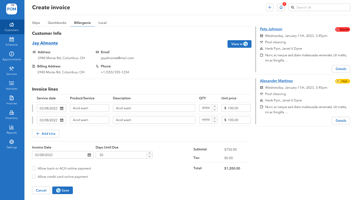
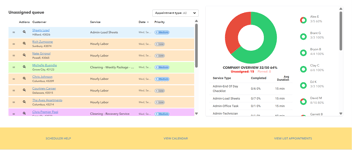
Top pool service software offers drag-and-drop job scheduling, route optimization, and instant communication between techs, admin, and office management. When these tools are linked to QuickBooks, every completed job seamlessly generates an invoice, eliminates double entry, and ensures nothing falls through the cracks. You immediately know which clients have paid (or are overdue), improving cash flow without the drama.
Reduce Human Error and Time Waste
By automating routine processes, you free your staff from hours of tedious data entry. Techs can log job completion and chemical use directly from the field; this information instantly updates both the job records and accounting books. This isn’t just more efficient—it also eliminates costly errors like duplicate charges or missed invoices.
Effortless Payroll & Tax Preparation
If you track technician hours through your pool management software, integration with QuickBooks means payroll is nearly automatic. Employee time sheets transfer right into QuickBooks payroll, and tax compliance becomes much simpler (especially when your accountant has direct access to unified, accurate records).
Real-Time Business Insights
When your operational data and financial performance are finally merged, you gain true visibility. See which routes, technicians, or services are most profitable. Make informed decisions on pricing, investment, and hiring, all with confidence in your numbers.
What Can You Automate with Pool Service Software + QuickBooks Integration?
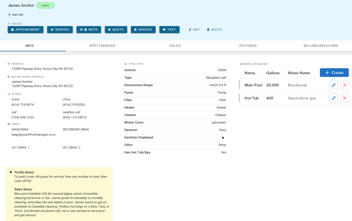
- Customer Management: Maintain a single record for each customer, synchronizing contact details, billing preferences, and service history across platforms.
- Scheduling & Dispatch: Log jobs in real time, set up recurring visits, and trigger invoices automatically as jobs are marked complete.
- Invoicing & Payments: Send digital invoices and collect online payments, with payment status and histories updating instantly in QuickBooks.
- Inventory Management: Track chemical and parts usage per client and get inventory levels in both systems for reordering alerts.
- Payroll & Time Tracking: Technicians log hours in the field; those hours sync to QuickBooks payroll or accounting modules for precise, paperless payments.
- Reporting & Business Intelligence: Generate custom reports for revenue by service category, route profitability, chemical costs per customer, and more.
Step-By-Step: How to Integrate Pool Software with QuickBooks Confirm Compatibility:
- Ensure your chosen pool service software offers direct QuickBooks integration (preferably for both Online and Desktop versions).
- Backup Your Data: Before beginning, back up both your QuickBooks company file and your pool service records. This step prevents accidental data loss.
- Start the Integration Wizard: Most modern solutions have a built-in setup guide—log in, authorize data sharing between accounts, and select the tables to sync (customers, invoices, payments, products).
- Field Mapping: Carefully map each key field (“Client Name” = “Customer Name”; “Service Date” = “Invoice Date”) between systems to prevent confusion or data duplication later.
- Set Sync Frequency: Choose real-time or nightly batch syncs, depending on your business needs. Real-time syncing is best for most growing businesses.
- Test and Validate: Run a series of test jobs and invoices to ensure the sync works as intended. Check customer records, invoices, and payments in both systems.
- Staff Training & Support: Train your admin staff and techs in the new workflow. Use vendor tutorials and support lines as needed.
- Ongoing Monitoring: Schedule periodic checks to ensure system health and reconcile data (especially at first). Most platforms alert you to mismatches or failed syncs for fast resolution.
Top Software Options for Pool Service and QuickBooks Integration
1. Pool Office Manager (POM) Integration Type: Direct, real-time sync with QuickBooks Online and batch export to QuickBooks Desktop.
Best For: Pool companies of any size, especially those that are seasonal or need flexible user management.
Highlights: 2-way sync, unlimited customers, built-in inventory and chemical calculator, free onboarding, and unlimited support.
2. Jobber Integration Type: Full sync with QuickBooks Online.
Best For: Broader field service businesses that also do pools.
Highlights: Drag-and-drop scheduling, automated invoicing, solid mobile app.
3. Housecall Pro Integration Type: QBO (QuickBooks Online) only.
Best For: Multi-service businesses needing a customizable platform.
Highlights: Strong payments and customer reminders.
4. Synchroteam Integration Type: Good for mobile workforces, time tracking, and payroll.
Best For: Companies with large tech teams and advanced logistics.
Highlights: Affordable pricing, robust mobile tools.
5. Intuit Field Service Management ES Integration Type: Deep native integration, but higher cost.
Best For: Large-scale or multi-location operations with complex back-office needs.
Real-World Use Cases
Example 1:
Reducing Time to Payment A pool company using POM integrates with QuickBooks Online. Techs in the field close jobs, and office staff send invoices immediately—automatically populated with accurate service data. Payment reminders trigger instantly for overdue clients, and the accounting team has a live view of A/R balances.
Example 2:
Managing Inventory Without Surprises Inventory tracking syncs with QuickBooks, so as chlorine or parts are used, stock levels and costs are reflected in both health and financial records. This makes end-of-year tax reporting smoother and helps managers spot which services are most profitable.
Example 3:
Seamless Payroll Staff clock in and out using the pool service mobile app. When it’s time to run payroll, QuickBooks already has the hours aggregated by employee, cutting prep from hours to minutes and reducing errors and compliance risks.
Common Challenges (and Solutions)
Data Duplication and Mismatches
When integrations aren’t set up with correct field mapping or don’t sync in real time, duplicate or incomplete records crop up. Use software with built-in duplicate detection, reconcile accounts monthly, and reach out to vendor support as needed.
Add-On vs. True Integration
Some pool service software only offers “add-on” integration (needing manual export/import steps). Modern systems like POM, Jobber, and ServiceTitan sync directly and automatically, so seek solutions labeled as real-time or native QuickBooks integrations.
Security and Data Loss
Risk Protect your business: use regular offsite backups, enable multi-factor authentication, and assign correct system permissions to avoid unauthorized data changes or leaks.
Questions to Ask Before Choosing Your Pool Software
- Does the integration work with QuickBooks Online and Desktop?
- Is there real-time sync, or must I do manual exports/imports?
- What fields are actually mapped (e.g., jobs, invoices, items, inventory, timesheets)?
- Is customer support available and knowledgeable about QuickBooks integration?
- What’s the level of training and onboarding included?
Final Thoughts:
Maximize Your Pool Business Potential Integrating your pool service management software with QuickBooks doesn’t just save keystrokes—it creates a single version of the truth for your business, streamlines every key operation, and positions your company to scale profitably. Immediate financial updates, accurate reporting, automated payroll, and improved customer experience—all become possible when you link what happens in the field to the back office with no manual lag.
Leading solutions—like Pool Office Manager—put best-in-class integration at their core, allowing you to focus on growth rather than bookkeeping headaches. Most importantly, you’ll free your techs and office staff to serve more clients, deliver better customer experiences, and achieve your financial goals.
Ready to see how true QuickBooks integration transforms pool service businesses? [Watch a Demo] and experience the advantages first hand.