
In this post
Get the latest insights delivered to your inbox
For decades, pool service companies have relied on paper logs to track chemicals, maintenance, client requests, job completion, and billing notes. While paper records were once the industry norm, today’s digital-first economy demands faster, more accurate, and more transparent paperwork. Moving from paper logs to digital pool service reports isn’t just about switching tools—it’s a transformation that reorganizes your workflow, reduces errors, improves communication, and elevates client satisfaction.
If you’re still using paper spreadsheets, notebooks, or printed checklists, this complete guide will take you step-by-step through modernizing your operations and unlocking powerful benefits—from real-time updates to secure data storage to compelling customer service. By the end, you’ll be ready for a smooth and effective transition.
Ready to see how easy modern digital service reporting can be? [Get a Demo] of Pool Office Manager’s mobile app and reporting system today.
Why Replace Paper Logs with Digital Service Reports?
1. Accuracy and Completeness Paper forms are susceptible to errors and lost pages. Hand-filled log entries are often incomplete, leading to overlooked chemical adjustments or missed safety checks. Digital reports prompt technicians with mandatory fields, error checks, and autocomplete features, dramatically improving data quality.
2. Instant Accessibility and Updates With paper logs, customer service reps and management may work with delayed or incomplete info, causing response time lags. Digital reports uploaded in real time are immediately accessible everywhere—office, techs, clients—enabling proactive communication and faster problem resolution.
3. Enhanced Customer Transparency Clients expect proof of service and detailed job reports. Digital reports with photos, timestamps, and technician notes can be automatically emailed or accessed via client portals, building trust and reducing billing disputes.
4. Eco-Friendly and Cost-Effective Reducing paper waste saves trees and office budgets. Digital records eliminate printing, storage, and physical document handling, freeing admin staff for more valuable tasks.
5. Integration Across Your Business Digital service reports can seamlessly integrate with APIs and back-office tools, syncing data with billing, CRM, inventory, and compliance records. This integrated flow avoids duplicated data input and streamlines accounting and auditing.
What Does a Digital Pool Service Report Include?
Modern digital reports can capture and track everything a paper log might use—and more:
- Customer and pool information
- Service dates and technician identification
- Chemical readings (pH, chlorine levels, alkalinity, etc.)
- Treatment notes and products added
- Job status and duration
- Photos and video evidence of work done
- Readily fillable checklists (safety, cleaning steps, equipment checks)
- Client signatures or approvals
- Automated calculations (chemical dosing recommendations)
- Comments, follow-up requests, or observations
- GPS and timestamp data for compliance and auditing
Step-by-Step: How to Transition from Paper to Digital Reporting
Step 1: Evaluate Your Current Workflow Map out how your team currently logs, submits, reviews, and stores service reports. Where do bottlenecks, errors, or delays occur? What paper log formats do they use? Which information is critical? Understanding your starting point will guide your selection of a digital system.
Step 2: Choose the Right Digital Solution Look for pool service software specialized in digital reporting, with mobile apps for technicians.
Key features to prioritize:
- Intuitive mobile forms supporting offline use
- Automated chemical calculators and error checks
- Secure cloud storage with easy access for office and clients
- Integration with billing, inventory, and CRM systems
- Customizable checklists and branding
- Photo/video attachments and GPS tagging
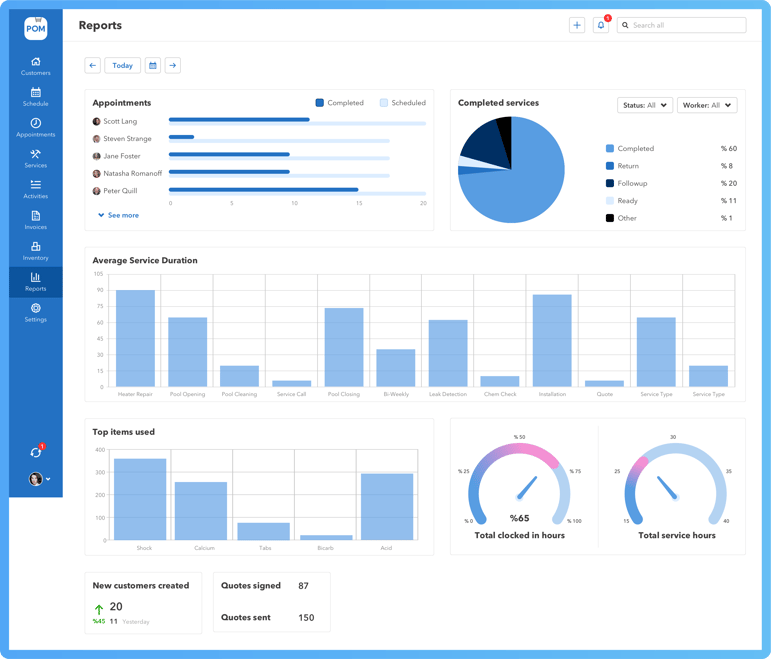
- Real-time reporting and analytics dashboards
Step 3: Prepare Your Team and Data Train your technicians on mobile devices and new reporting processes. Create templates for common pool types and services. Digitize important historical logs if possible, or archive them for reference.
Step 4: Pilot and Iterate Start with a small tech team or specific routes. Collect feedback on usability and technical issues. Monitor report accuracy and turnaround time. Make necessary adjustments to forms, device settings, or workflow.
Overcoming Challenges in Transition
Resistance to Change
Technicians used to paper may resist learning an app. Involve them early, highlight time saved on paperwork, and pair techs with digital champions for peer support.
Technical Issues
Poor connectivity onsite? Ensure offline forms with auto-sync when connectivity resumes. Provide training and quick-access support resources.
Data Security Concerns
Cloud-based storage must comply with industry standards and encrypt sensitive info. Choose reputable vendors with solid privacy policies.
Benefits Observed by Pool Businesses Who Made the Switch
- 30% reduction in administrative time spent on data entry and filing
- 50% fewer billing disputes due to transparent, photo-verified service documentation
- Significant improvement in technician compliance with safety protocols
- Faster client invoicing—often same-day or within hours instead of days
- Increased ability for managers to monitor real-time job progress and reassign work quickly
Tips for Maximizing Digital Reporting Efficiency
- Customize digital report templates for different pool types and services
- Set mandatory fields to avoid incomplete reports
- Use GPS stamps to verify technician location and service completion times
- Enable automatic report sharing with clients and office
- Leverage analytics to identify commonly missed steps or frequent service issues
- Automate follow-up task creation based on observations or client feedback
Conclusion:
Your Paperless Pool Business Starts Here Transitioning from paper logs to digital pool service reports offers undeniable advantages—from cleaner data and faster billing to higher customer satisfaction and easier audits. The process involves careful planning, choosing the right technology, and supporting your team through the change. However, the payoff is immediate and lasting, empowering your entire operation to work smarter, faster, and safer.
See digital reporting transform your pool business workflow—[Get a Demo] of Pool Office Manager to begin your paperless journey today.
.png?width=352&name=umbrella-chair-around-beautiful-luxury-swimming-pool%20(1).png)