In this post
Get the latest insights delivered to your inbox
Recurring revenue is the difference between an unpredictable pool business and one that feels stable, scalable, and sellable. Instead of starting every season at zero and hoping the phone rings, a recurring pool revenue model lets you begin each month with a baseline of guaranteed income from service agreements, maintenance plans, and predictable billing.
This guide walks through how to design, price, and operationalize a recurring revenue model for your pool company—and how software helps you manage the details so the model works in real life, not just on paper. The tone here is practical: build something that fits your team and market, then use automation to keep it running without constant manual effort.
1. Why Recurring Revenue Matters for Pool Companies
One-off jobs—green-to-clean rescues, emergency repairs, and seasonal openings—can be profitable, but they are also unpredictable. A recurring pool revenue model solves several common problems:
- Cash flow stability: You know roughly what’s coming in each month, even outside peak season.
- Higher customer lifetime value: Long-term clients spend more over time on upgrades, repairs, and add-ons.
- Better route planning: Recurring stops make it easier to plan efficient, dense routes.
- Higher business valuation: Businesses with recurring revenue are more attractive to lenders and buyers.
The idea is simple: shift as many customers as reasonably possible from “call us when something breaks” to “we take care of your pool all year on a plan.”
2. Decide What Kind of Recurring Model Fits Your Business
There is no single correct recurring structure. Most pool companies blend several of these:
A. Weekly or Bi-Weekly Service Plans
This is the classic recurring model:
- Regular visits for cleaning, testing, and balancing.
- Optional tiers (standard, premium, chemicals included, etc.).
- Billed monthly or on a fixed schedule.
B. Seasonal or Annual Service Contracts
Especially useful in seasonal markets:
- Contracts that include open/close, scheduled check-ups, and perhaps mid-season tune-ups.
- Payments spread across the season or year rather than only at service dates.
C. Membership or “Care Plan” Add-Ons
Layered on top of standard service:
- Priority scheduling, discounted repairs, extended warranties, or equipment checks.
- Monthly fee for a bundle of benefits.
D. Commercial and HOA Maintenance Agreements
For commercial or shared pools:
- Multi-visit-per-week plans with clear service levels, logs, and compliance reporting.
- Multi-month or annual agreements, often with formal proposals and renewals.
Start by deciding which of these best fits your current customers and market. You can always expand or refine, but you need one or two core recurring models to anchor your revenue.
3. Design Clear, Simple Service Packages
Your recurring revenue model lives or dies by clarity. Customers should understand what they’re paying for and why it’s valuable.
Steps to Build Packages
- List your recurring tasks.
Skimming, brushing, vacuuming, emptying baskets, backwashing, testing and balancing, equipment checks, etc. - Group tasks into tiers.
- Basic: Water testing, chemical adjustments, basket emptying.
- Standard: Basic plus brushing, netting, quick vacuum, basic equipment check.
- Premium: Standard plus more detailed vacuuming, deeper equipment inspection, minor adjustments.
- Decide what’s included vs. extra.
- Are chemicals included or billed separately?
- Are minor parts or filter cleans included or add-ons?
- Where is the line between “maintenance” and “repair”?
- Give packages names and simple descriptions.
Names and a short explanation help customers choose without confusion.
Where Software Helps
Once packages are defined, software lets you:
- Save them as reusable items for estimates and invoices.
- Attach the right package to each customer profile.
- Keep pricing consistent across the team.
This reduces custom, one-off arrangements that can break your recurring model and confuse staff.
4. Choose a Billing Structure That Supports Recurring Revenue
Billing is where recurring models become real. Two broad approaches are common:
A. Per-Visit Invoicing
- Each visit generates an invoice based on a set rate.
- Customers may see slightly different totals if chemicals or extras vary.
- Works fine, but can lead to more administrative work.
B. Flat Monthly or Seasonal Billing
- Customers pay a fixed amount monthly or for the season.
- Visit count and standard tasks are included in that fee.
- Extras (repairs, large parts) are billed separately.
Flat billing tends to support more predictable revenue and easier budgeting—for both you and the customer. It also allows you to offer memberships and “all-in” plans that feel simple and premium.
Software’s Role
Software can:
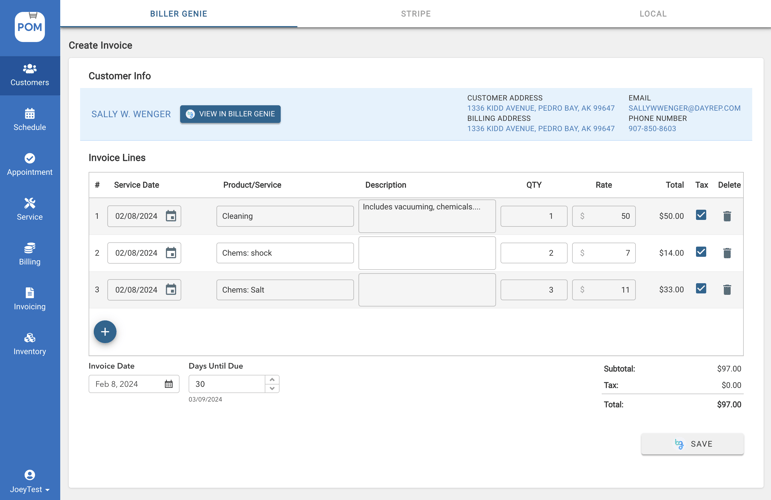
- Generate recurring invoices or auto-charges on a set schedule.
- Tie each billing event to the correct plan and customer.
- Track which customers are on which package, and flag failed payments.
Done manually, this is spreadsheet chaos. With a system, it becomes a background process you review rather than constantly rebuild.
5. Map Recurring Services to Efficient Routes
A recurring pool revenue model only boosts profit if your routes stay efficient. The more recurring customers you add, the more important route design becomes.
Route Considerations
- Geographic grouping: Group customers by neighborhood or area to minimize drive time.
- Day-of-week assignments: Assign days to areas (e.g., “North side on Mondays; East side on Tuesdays”).
- Time windows for premium clients: Some plans might offer tighter arrival windows or special considerations.
Using Software to Support Routing
With route-capable software, you can:
- View all recurring stops on a map.
- Adjust routes as you add or lose accounts.
- See how long visits actually take and rebalance workloads.
This makes it possible to add recurring accounts without your techs spending more time driving than cleaning.
6. Convert Existing Customers to Recurring Models
You don’t have to start from scratch—many of your current customers can be invited into a recurring plan.
Step-by-Step Transition
- Segment your existing clients.
Identify who already uses you regularly (weekly, bi-weekly, or seasonal patterns). - Create a clear offer.
Example: “Lock in a flat monthly rate, priority service, and predictable maintenance with our Standard Weekly Plan.” - Communicate benefits, not just features.
- No surprise bills for basic maintenance.
- Fewer emergencies and green pool “surprises.”
- Easier budgeting and smoother seasons.
- Provide an easy way to say yes.
Digital agreements, simple email approvals, or portal-based signup make conversion easier. - Follow up consistently.
Not everyone will sign up after one conversation; plan a few gentle reminders and include info in service reports and invoices.
Software helps track who was pitched, who is on which plan, and who might be ready for an upgrade. That way, you aren’t trying to remember every conversation by hand.
7. Use Automation to Keep Recurring Revenue Running Smoothly
Once you have recurring plans and customers onboarded, automation keeps the machine humming.
Helpful Automations
- Recurring scheduling: Automatically generate visits for weekly/bi-weekly plans across the season.
- Automated reminders: Notify customers before visits or seasonal service windows.
- Recurring invoicing or autopay: Charge or invoice on a reliable cycle with minimal manual touches.
- Renewal prompts: Remind seasonal or annual clients when it’s time to renew.
The more of this that happens automatically, the less likely you are to miss a renewal, forget an increase, or lose track of a customer who would have gladly stayed.
8. Layer Upsells and Add-Ons Into Your Recurring Base
Recurring revenue isn’t just the base service fee. It creates a platform for up-selling and cross-selling in a way that feels natural, not pushy.
Common Add-On Opportunities
- Filter cleans and media replacements.
- Heater inspections and tune-ups.
- Energy-efficient pump or lighting upgrades.
- Automation and smart control installations.
- Specialty chemical treatments.
Because you see these pools regularly, you can:
- Spot needs early.
- Present options with photos and data.
- Schedule upgrades during slower periods.
With software, techs can flag opportunities in the field, attach photos, and send them back to the office for follow-up. This makes add-ons part of a smooth process instead of random “if we remember to ask” moments.
9. Track Key Metrics for a Healthy Recurring Model
You’ll know your recurring pool revenue model is working when certain numbers move in the right direction. A few to watch:
- Number of customers on recurring plans.
- Monthly recurring revenue (MRR).
- Churn rate: How many recurring accounts you lose per season.
- Average revenue per customer: Including add-ons and upgrades.
- Route profitability: Revenue vs. actual time and cost per route.
If you see churn creeping up, it’s a signal to improve service or communication. If MRR grows and churn stays low, your model is building a stable base you can rely on.
Software that ties together customer records, schedules, and invoicing makes these metrics easier to track without building complex spreadsheets from scratch.
10. Common Pitfalls to Avoid When Building Recurring Revenue
Even good models can run into trouble. Watch for:
- Overpromising in plans: Including too many “extras” in a flat fee can erode margins. Start lean and add value carefully.
- Underpricing: Failing to account for rising chemicals, fuel, and labor costs will make growth feel more stressful than rewarding.
- Lack of documentation: If what’s included in each plan isn’t documented, techs and customers will have different expectations.
- Manual admin overload: If every renewal, invoice, and schedule tweak is manual, the recurring model becomes a burden instead of a benefit.
The fix is usually the same: tighten packages, review pricing annually, communicate clearly, and lean on software to handle repetitive tasks and documentation.
Bringing It All Together
A recurring pool revenue model doesn’t appear overnight. It’s built step by step:
- Decide which recurring structures fit your market (weekly, seasonal, commercial, memberships).
- Design clear, simple packages and align pricing with real costs.
- Choose a billing structure and route design that supports profitability.
- Transition existing customers and build recurring offers into every new quote.
- Use automation to handle scheduling, billing, renewals, and reminders.
- Layer on upgrades and add-ons in a structured way.
- Track a few key metrics and refine your model over time.
Throughout this process, the right software isn’t just “nice to have”—it’s what keeps the model realistic and sustainable. It connects your agreements, schedules, visits, invoices, and renewals so the recurring machine runs with fewer dropped balls and less manual heroics.
A Simple Next Step: See How Software Can Support Your Recurring Model
If you’re serious about building a recurring revenue engine for your pool company, the next practical step is to see how a modern pool service platform handles:
- Creating and managing plans and packages.
- Automating recurring visits and billing.
- Keeping customer, route, and payment information in one place.
- Flagging renewals and opportunities for upgrades.
A short, focused demo can walk you through a typical recurring scenario—from signing a client onto a plan, to scheduling their visits, to billing them monthly, to renewing them next season. Seeing that flow in action makes it much easier to decide whether the system fits how you and your team actually work.
If you want your revenue to be more predictable, your routes more profitable, and your seasons less stressful, exploring a software demo is a low-risk way to find out if this is the foundation your recurring model has been missing.