
Everything pool service companies ask us about pricing, the 30-day trial, QuickBooks, the tech mobile app, migration, and support. Can’t find your question? Call 614-710-0074 — a real person answers.
Frequently Asked Questions
The short version
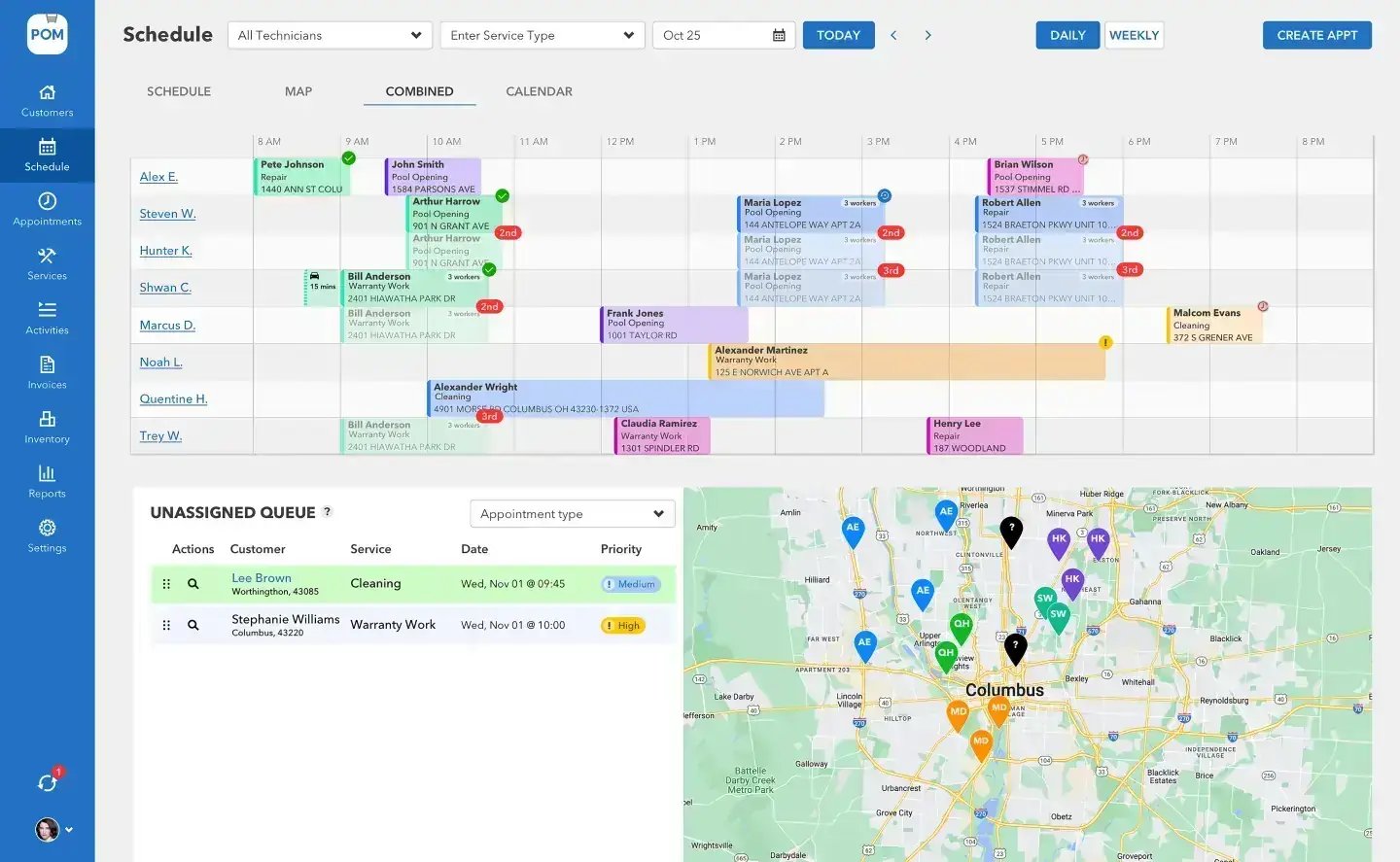
Pool Office Manager is all-in-one software built specifically for pool service and repair companies: scheduling, dispatching, customer management, invoicing, water chemistry, inventory, quoting, and reporting in one platform — built by pool pros, since 2014, and used by more than 200 pool service companies. The full question list is below; here are the essentials at a glance.
Pricing at a glance
Simple pricing, no surprises
$125 + $25
$125/month for your first user, $25/month for each additional active user — every core feature included. Optional add-ons: QuickBooks Online (+$25/mo) and customer texting (from $10/mo).
No setup fees
No setup, onboarding, or implementation charges. Your 20-minute setup call, data import, and training are all included.
No contracts
Month to month, cancel anytime. Turn users on and off by season so you never pay for idle seats.
Getting started
The trial: 30 days, every feature, instant access. You enter a card at signup; nothing is charged until day 30, and the card is charged for your first month on day 30 unless you cancel. Cancel anytime — reply to any of our emails or call 614-710-0074 and we’ll take care of it, no questions asked.
The demo: book a 20-minute setup call from our website. We don’t just show you the software — we import your data and build your first week of schedules with you, live.
Who it’s for: pool service and repair companies — owners and office managers running 5 to 30 technicians with recurring residential or commercial customers, across the United States.
BIG PICTURE
Ready to see it on your own pools?
30 days, every feature, your real data. We’ll even build your first week of schedules with you.

Switching to POM
Migration is free — including from competitors. Send whatever your current system exports to files@poolofficemanager.com with your company name in the file name; we clean and import it, usually within 1 business day. Most companies are fully proficient in POM within 7 to 21 days, and we recommend running both systems for the first week or two.
Support that answers the phone
US-based phone support — a real person, not a chatbot: 614-710-0074. Email help@poolofficemanager.com, and the knowledge base covers the whole product with videos and step-by-step guides. Support and training are included at no additional charge.
Keep exploring
Pricing · All features · POM vs Pool Brain · Switching from Pool Brain · Software pricing explained · Fix emails going to spam
We were excited to try this program and have been satisfied with the use. Love the scheduling feature, from an office stand point, and the guys are happy with not having to use paper.
Town & Country
I can easily keep track of my employees progress throughout the day and have the ability to send other techs to fill in if needed. Love the maps optimization feature. Saves time and money
Aqua Clear Pools
Great software program. Keeps our route in order while providing detailed service reports to all of our clients when the cleaning/maintenance is complete
Blue Water Pools
FAQ
All the questions
What is Pool Office Manager?
All-in-one software built specifically for pool service and repair companies: scheduling, dispatching, customer management, invoicing, water chemistry, inventory, quoting, and reporting in one platform — built by pool pros, since 2014, and used by more than 200 pool service companies.
Is there a free trial?
Yes — 30 days, every feature, instant access. You enter a card at signup; nothing is charged until day 30, and the card is charged for your first month on day 30 unless you cancel. Cancel anytime before then — reply to any of our emails or call 614-710-0074 and we’ll take care of it, no questions asked.
How much does Pool Office Manager cost?
$125/month for your first user, $25/month for each additional active user, with every core feature included. Two optional add-ons: QuickBooks Online integration (+$25/month) and customer text messaging (from $10/month; allow 24 to 48 hours to activate). No tiers, no features locked behind upgrades.
Are there any setup fees or contracts?
No setup, onboarding, or implementation charges — and no contracts. Month to month, cancel anytime, and you can turn users on and off by season so you never pay for idle seats.
Does POM integrate with QuickBooks?
Yes — the QuickBooks Online add-on (+$25/month) gives you two-way sync of customers, items, and invoices, with status syncing back automatically throughout the day. Using QuickBooks Desktop? You export two reports and we import them for you — see “Bring in your existing data” in our knowledge base.
Does POM track water chemistry?
Yes, right in the service report: pH, chlorine, alkalinity, calcium, cyanuric acid, salt, phosphorus and more, each reading displayed beside the previous visit’s value. The built-in dosing calculator uses the saturation index (LSI) and the actual gallons of each body of water to tell your tech exactly what to add. Full chemistry history per customer.
Can I track inventory and chemical usage?
Yes — multi-location inventory across warehouse and trucks, barcode scanning, automatic deduction as techs log usage during visits, and usage reports.
Does POM handle quotes?
Yes — quotes with e-signature approval that convert to invoices in one click.
Can I track pool equipment per customer?
Yes — each body of water carries its equipment (pump, filter, heater, cleaner, sanitizer) and notes your techs see on every visit.
Does POM include GPS tracking and a time clock?
Yes — technician locations on the map during the workday, an activity dashboard, and built-in clock in/out from the mobile app and desktop with reports for payroll.
How hard is it to switch from another system?
Easier than you think, and migration is free — including from competitors. Send us whatever your current system exports; we clean and import it, usually within 1 business day. Most companies are fully proficient in POM within 7 to 21 days.
How do I send my data?
Three ways: connect QuickBooks Online and customers sync in automatically; email your file to files@poolofficemanager.com with your company name in the file name (questions to help@poolofficemanager.com); or ask us on your setup call and we’ll do it with you.
Will I lose my service history?
Your POM history starts the day you begin. Talk to us about bringing over historical data — most companies start fresh and keep the old system for reference during the transition. You can run both systems in parallel, and we recommend it for the first week or two.
What kind of support do you offer?
US-based phone support — a real person, not a chatbot: 614-710-0074. Email help@poolofficemanager.com, and our knowledge base covers the product with videos and step-by-step guides. Support is included at no additional charge.
Do you offer training?
Yes — the 20-minute setup call to start, live training sessions with our team, and a knowledge base your whole crew can use. Most technicians are comfortable in the mobile app within days.
Is my data secure? Can I export it?
Your business data is stored securely and backed up regularly — contact us for specifics about our security practices. And yes, you can export your data anytime: CSV exports for customers, service records, and more. You own your data.
Still have questions?
Call 614-710-0074, email help@poolofficemanager.com, or start the 30-day trial and see for yourself.