In this post
Get the latest insights delivered to your inbox
A modern pool technician needs more than a test kit and a truck. Between juggling routes, tracking chemicals, keeping notes, sending invoices, and fielding customer messages, there is a lot to stay on top of every day.
The right apps can turn that chaos into a smooth, predictable workflow. This guide walks through the best apps for pool service technicians in 2025, focusing on tools that help you stay organized, work faster, and deliver a more professional experience.
The goal is not just to download “more apps,” but to build a simple toolkit that supports the way you actually work in the field. By the end, you’ll see how combining a strong, all‑in‑one pool management platform with a few specialized helpers gives you an edge without overcomplicating your day.
Why Pool Techs Need a Solid App Stack:
On a typical route, a tech might:
- Check the day’s schedule and routes.
- Navigate between jobs and handle last‑minute changes.
- Test water, calculate and add chemicals.
- Take notes, photos, and record issues.
- Communicate with customers and office staff.
- Log time, complete checklists, and invoice.
Trying to do all this on paper or across random apps quickly leads to mistakes and wasted time. A good app stack helps by:
- Centralizing job information and history.
- Automating routine tasks (like reminders and recurring jobs).
- Making records easy to find later.
- Reducing double entry and manual calculations.
- Helping you look more professional to customers.
Key Features to Look For in Pool Tech Apps
Before looking at specific apps, it helps to know what to look for:
- Mobile-first design: Fast, simple interface that works well on a phone in the field.
- Offline support: Ability to keep working when cell service is spotty, then sync later.
- Route and schedule visibility: Clear view of your day, with real‑time changes.
- Job details in one place: Gate codes, notes, photos, chemical history, and special instructions.
- Chemical tools: Calculators and logs to keep water balanced and compliant.
- Easy reporting: Quick ways to capture photos and notes and turn them into customer‑ready reports.
- Integrations: Connection to invoicing, accounting, and CRM tools to avoid double work.
With that in mind, here are some of the best app categories—and leading options—for pool technicians.
1. All‑in‑One Pool Service Management Apps
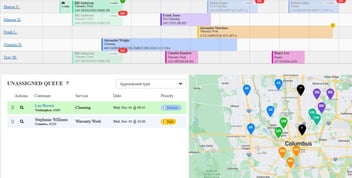
These are the apps that aim to handle almost everything: scheduling, routes, job notes, chemicals, photos, and often billing too. For most pool companies, this is the “hub” that everything else connects to.
What an all‑in‑one app typically includes:
- Technician mobile app with daily schedule.
- Drag‑and‑drop calendar for office staff.
- Route view and map for planning.
- Job checklists and notes.
- Photo capture and attachment to service records.
- Chemical readings and dosage logging.
- Basic or advanced invoicing tools.
Using one primary system like this keeps everyone on the same page. Rather than techs bouncing between several unrelated tools, they open one app and see everything they need for each stop.
2. Navigation and Route Optimization Apps
Even with great scheduling, poor routing wastes time and fuel. Route and navigation tools help pool techs cut down on backtracking and traffic delays.
What these apps help with:
- Turn‑by‑turn navigation from job to job.
- Suggested route orders to minimize drive time.
- Alternative routes when traffic or closures appear.
- Fast ETA sharing if needed.
Some pool‑specific platforms build route optimization right in, so techs don’t need a separate route app. Others will integrate or let you tap through to your favorite navigation app.
3. Chemical Calculator and Testing Apps
Water chemistry is one area where accuracy really matters. Chemical calculator apps help techs turn test readings into precise dosing instructions.
Common features:
- Pool volume estimators and saved pool profiles.
- Input fields for pH, chlorine, alkalinity, hardness, stabilizer, and more.
- Recommended adjustments with amounts and product types.
- Logging and history of past readings and chemical additions.
Using a calculator means less guesswork, fewer callbacks, and more consistent results. Some all‑in‑one pool apps include built‑in calculators, which means techs don’t need to retype data multiple times.
4. Note Taking, Photos, and Reporting Apps
Documentation protects you and builds trust with clients. Photo and note apps help capture issues and work done.
Useful capabilities:
- Quick photo capture with light annotation (circling issues or adding text).
- Simple text or voice notes per job.
- Ability to combine notes and photos into a report.
Many pool‑specific platforms let you generate a branded service report right from the app, using the notes, readings, and photos techs already captured.
5. Communication and Collaboration Apps
Even with a strong field app, there are times when techs need quick back‑and‑forth with dispatch or other techs (for example, to troubleshoot a tricky heater or automation panel). Lightweight messaging tools help with that, but it’s ideal when messages can stay tied to jobs or customers instead of being scattered across random group chats.
Putting It All Together: A Practical Tech Stack for Pool Technicians
For most pool service teams, a practical setup looks like this:
- One main pool service management app as the hub (schedule, jobs, chemicals, reports).
- Navigation handled either inside that app or through a standard map app.
- Optional specialized tools (if the main app doesn’t already cover that area).
The value isn’t in sheer number of apps, but in the combination: one central system that keeps everything organized, plus a few well‑chosen helpers for special tasks.
How an All‑in‑One App Improves a Tech’s Day
To see the impact, imagine a tech’s day with a good all‑in‑one app:
- Morning: Tech opens the app and sees their full route, including job order, notes, and special instructions.
- At each stop: They review past notes, test water, use a built‑in calculator to dose accurately, check off tasks, snap photos, and mark the job complete.
- Throughout the day: The office can see where they are in the schedule and adjust priorities if urgent jobs pop up.
- End of day: All work is already logged. Invoices can be generated automatically, and customers receive digital reports without extra typing.
Choosing the Right Apps for Your Team
Every company is a little different, so it can help to ask:
- How many techs do we have, and how fast are we growing?
- Do we struggle more with scheduling, routing, chemical logging, or billing?
- How comfortable is the team with new technology?
- Do we want everything in one place, or are we okay combining multiple tools?
If your routes are growing and your techs are spending too much time on paperwork or phone calls, starting with a strong pool‑specific management app often delivers the fastest improvement. Once that’s in place, add extra tools only where there’s a clear gap.
Subtle Ways the Right Software Helps You Level Up
Beyond the day‑to‑day benefits, the right software quietly helps you:
- Onboard new techs faster: They can see checklists, photos, and history for each pool instead of relying only on verbal instructions.
- Standardize service quality: Every tech follows the same steps and documentation, regardless of experience level.
- Win and keep better clients: Detailed digital reports and reliable scheduling stand out to HOAs, commercial clients, and high‑end residential customers.
- Make better decisions: Over time, the data in your system shows which routes are profitable, where you’re losing time, and where to focus marketing.
These advantages build over months and seasons. Companies that adopt dedicated pool software often find that as their routes grow, their days actually feel more manageable—not more chaotic.
Why It’s Worth Seeing a Demo
Reading about features is helpful, but seeing how an app actually handles your kind of routes, customers, and services is the real test. A good demo should answer questions like:
- How easy is it for techs to learn and use the mobile app?
- How does the system handle last‑minute changes and weather problems?
- Can it manage our mix of weekly, bi‑weekly, seasonal, and one‑off jobs?
- What does a finished service report look like for our clients?
- How much of our billing and reporting can we automate?
If you’re curious what this looks like in practice, it’s worth taking 20–30 minutes to see a live walkthrough. You’ll quickly get a feel for whether it fits your team and your goals.
Conclusion
Pool service technicians have a lot on their plates every day. The right apps don’t just make life a little easier—they change how efficiently a business can operate, how professional it looks to customers, and how confidently it can grow. By building a simple, thoughtful app stack—centered around a strong, pool‑specific management platform—you set your team up for smoother days, fewer mistakes, and better results.
If your current setup feels like a jumble of paper, texts, and gut feel, this is a good moment to see what a dedicated pool service app can do. Exploring a demo is a low‑risk way to see whether modern software matches the way you and your techs actually work in the field—and whether it can quietly shoulder some of the load you’re carrying now.