In this post
Get the latest insights delivered to your inbox
Growing a pool service company from a small, tight team to a multi‑truck operation sounds exciting—until the reality hits. Schedules break down, communication gaps widen, billing gets messy, and quality becomes inconsistent.
Many owners discover that what worked at three technicians simply collapses at six, let alone 12.
This case study follows a fictional but realistic company, BlueWave Pool Care, as it scales from 3 to 12 technicians using Pool Office Manager (POM) as its operational backbone. The scenarios mirror what pool‑specific platforms are built to solve: chaotic routing, weak documentation, scattered billing, and difficult training—all of which become more painful as the team grows.
Starting point: a 3‑tech team at its limit
BlueWave began like many pool companies:
- 1 owner in the field plus 2 technicians.
- Around 140 recurring residential accounts and a few commercial pools.
- Basic tools: paper route sheets, shared spreadsheets, and QuickBooks for billing.
At this size, the owner could:
- Personally know most customers.
- Step in when something went wrong.
- Manually adjust schedules on a whiteboard when needed.
But demand kept climbing. By the time they approached 3 full routes’ worth of work:
- The whiteboard was crowded and constantly rewritten.
- Techs frequently texted for gate codes, last‑visit issues, or chemical history.
- The owner was spending evenings reconciling incomplete route sheets with QuickBooks.
- New hires shadowed the owner for weeks because nothing was documented in a structured way.
The owner realized they were already “maxed out” at three technicians. Scaling to 5, 8, or 12 would be impossible without fundamentally changing how the business was run.
Why BlueWave chose Pool Office Manager
BlueWave evaluated different types of software:
- Generic field‑service tools built for any trade.
- Lightweight invoicing and payment apps.
- Pool‑specific solutions focused on route scheduling, chemical logs, and QuickBooks alignment.
They chose Pool Office Manager because it promised:
- A single hub for scheduling, routes, job history, and billing.
- A mobile app technicians could actually use in the field.
- Clean, reliable syncing with QuickBooks so billing did not require re‑typing.
- Workflows designed for pool companies—weekly service, openings, closings, green pools, and commercial stops.
In short, it matched the structure BlueWave wanted to grow into, rather than forcing them to reinvent their business around a generic system.
Phase 1: Stabilizing the 3‑tech operation
Before thinking about 12 technicians, BlueWave had to make the current team sustainable.
Step 1: Centralizing all scheduling and customer data
They moved:
- All customer records into POM, including addresses, contact info, gate codes, and special notes.
- All recurring weekly and bi‑weekly stops into the POM calendar.
- Seasonal jobs (openings, closings) into templates with their own checklists.
Now, instead of multiple spreadsheets and notes, there was one live schedule.
Step 2: Getting technicians fully onto the mobile app
Techs learned how to:
- View their daily route and use in‑app navigation.
- Open each job to see instructions and last‑visit history.
- Follow simple visit‑type checklists (weekly, opening, closing, commercial).
- Log chemical readings, notes, and photos.
- Mark jobs complete before moving to the next.
This reduced phone calls to the office, improved documentation, and set the pattern for how future techs would work.
Step 3: Linking field work to billing
BlueWave configured POM to:
- Generate billable records whenever a job or recurring service was completed.
- Push invoices into QuickBooks on a set rhythm (weekly or monthly per customer).
- Support online payments to speed up cash flow.
This change alone eliminated many missed invoices and removed hours of manual data entry.
With those three steps, the 3‑tech team became stable, predictable, and much less dependent on the owner’s memory and nightly admin marathons.
Phase 2: Growing from 3 to 6 technicians
Once the foundation was solid, BlueWave started adding staff.
Hiring their 4th and 5th technicians
Previously, onboarding a new tech took weeks of ride‑alongs and ad‑hoc instruction. With POM in place:
- New hires received app logins, a walkthrough of the route screen, and job workflow.
- They shadowed a senior tech for a few days to learn physical techniques and customer expectations.
- After that, POM’s checklists and history gave them enough structure to handle part of a route independently.
Because every visit type had a consistent digital process, new techs were no longer learning “how Bob does it” versus “how Chris does it.” They were learning how BlueWave does it.
Splitting and refining routes
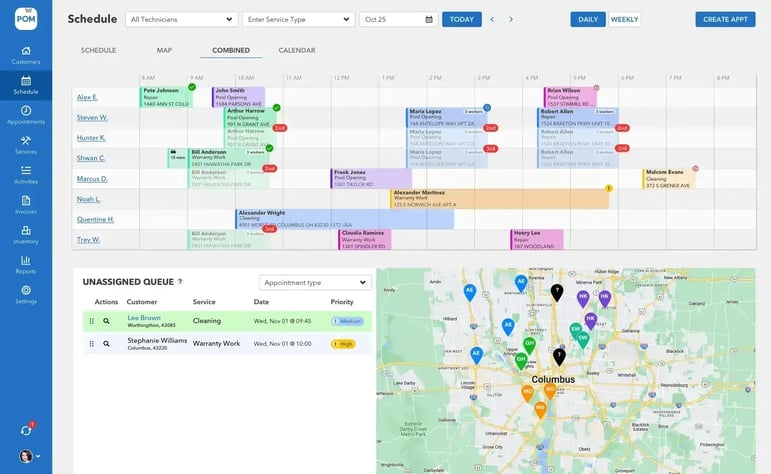
As more techs came on, BlueWave used POM’s map view to:
- Split overloaded routes into smaller, tighter clusters.
- Reassign customers geographically to reduce drive time.
- Balance days by number of stops and estimated time.
The live map made it clear where adding a new tech would have the biggest impact—often by breaking a long, zigzagging route into two compact ones.
Improving office visibility
With 5 techs on the road, POM’s status tracking became crucial:
- The office could see which jobs were done, in progress, or not started without making calls.
- When a tech fell behind, the office dragged a few stops to another tech, whose app updated instantly.
- The owner could see, at a glance, how the day was going.
This level of visibility is nearly impossible with paper and scattered apps. It prevented overload and burnout as staff count grew.
Phase 3: Scaling from 6 to 12 technicians
The jump from 6 to 12 is where many companies fail—systems that barely held at 6 simply break. BlueWave stayed ahead of that curve by using POM as an operating system, not just digital paper.
Step 1: Formalizing roles and permissions
As the team expanded, BlueWave:
- Gave technicians field‑focused access: today’s jobs, customer notes, checklists, and history—but not sensitive financial settings.
- Assigned an office manager to handle scheduling, customer communication, and first‑line support.
- Left higher‑level configuration and financial oversight to the owner.
Pool Office Manager’s role‑based access made this simple to manage. Everyone saw what they needed, not everything.
Step 2: Using standardized workflows to train at scale
With 12 technicians, training quality became critical:
- Every visit type (weekly, opening, closing, green pool, commercial) had a defined POM checklist.
- New hires were trained directly on these workflows instead of arbitrary habits.
- Common errors could be spotted in app logs (for example, skipped readings, missing photos) and corrected.
This standardization let BlueWave maintain consistent quality even as people cycled in and out seasonally.
Step 3: Leveraging data for strategic decisions
With a full year of POM data, BlueWave could:
- See which routes and days were consistently overloaded.
- Identify “heavy” customers that consumed disproportionate time or chemicals.
- Compare revenue per stop and per route to adjust pricing or focus growth.
This data-driven view helped them:
- Raise prices where necessary.
- Politely offboard unprofitable accounts.
- Target marketing in neighborhoods that filled existing routes more efficiently.
Scaling from 6 to 12 techs without that insight would have meant growing top‑line revenue while possibly eroding margins. With POM, they grew both.
Concrete outcomes after reaching 12 technicians
Operational efficiency
- Dispatch and scheduling time per week stayed manageable, even as routes multiplied.
- The office manager could rapidly respond to daily surprises (sick calls, weather, access issues) without rewriting the day.
- Each tech’s day was realistic and routable, reducing overtime and frustration.
Technician experience
- Techs had clarity: they opened the app, saw where to go, what to do, and what had already been done.
- They spent less time on the phone and more time at pools.
- Good documentation meant they felt protected—if a customer complained, their notes and photos were there.
This helped BlueWave retain good staff and onboard new hires faster.
Financial performance
- The company significantly reduced missed or delayed billing, because every completed job flowed into an invoice workflow.
- With more complete billing and optimized routes, revenue per tech increased.
- Cash flow improved because invoices went out sooner, with fewer disputes.
The owner could finally see the business as a set of measurable, improvable systems rather than a daily emergency.
Lessons for other pool companies from BlueWave’s journey
1. Fix your system at 3–4 techs, not at 10–12
Waiting until you have 8 or 10 technicians to implement real software makes the transition harder. BlueWave’s smartest move was adopting POM at 3 techs, then growing on top of that platform.
2. Treat software as your operating system, not a side tool
They insisted that:
- All scheduling go through POM.
- All field work be logged in the app.
- All billing start from completed jobs in the system.
Partial adoption leads to partial benefits; full adoption is what created the leverage to scale.
3. Standardization is your friend
Checklists and templates may feel “rigid” at first, but they:
- Protect quality as you hire more techs.
- Make training easier and faster.
- Give you consistent data to analyze and improve.
4. Data is not just for big companies
Seeing route performance, customer profitability, and workload distribution is how BlueWave made smart decisions about pricing, marketing, and staffing. That same data is available to any pool business willing to use POM consistently.
Is Pool Office Manager right for your scaling journey?
If you are:
- At 2–4 techs and feeling stretched.
- Already at 5–6 techs and worried about losing control.
- Considering a jump to 10+ techs in the next few years.
…then your biggest risk is not lack of demand—it is lack of systems. The pain points BlueWave faced are the same ones most growing pool businesses hit: messy schedules, scattered notes, weak documentation, and leaky billing.
Pool Office Manager gives you:
- A pool‑specific schedule and route engine that can handle many techs and routes.
- A shared, guided workflow for every visit type your team performs.
- A direct line from field work to billing and QuickBooks.
- Visibility into your day, week, and season so you can adjust with confidence.
A practical next step: Try a free trial on your existing routes
To see whether you could scale like BlueWave did:
- Take your current three or four routes.
- Recreate them inside Pool Office Manager during a trial or demo.
- Walk through a typical day from the perspective of the office and a tech.
- Imagine doubling or tripling your tech count on top of that structure.
If it feels like the controlled, scalable version of your current operation, that is a strong signal that Pool Office Manager is the right platform to help you go from 3 to 12 technicians without losing your sanity—or your margins.
Clicking “Try free trial” then becomes less about testing software and more about testing how far your pool business can grow once the right systems are finally in place.