
Jobs move, quotes get signed, and a tech logs low water at a pool across town. Pool Office Manager alerts send each event to the person who needs to act, in the app, by email or by text, and collect everything in one inbox so nothing slips.
The right person hears first
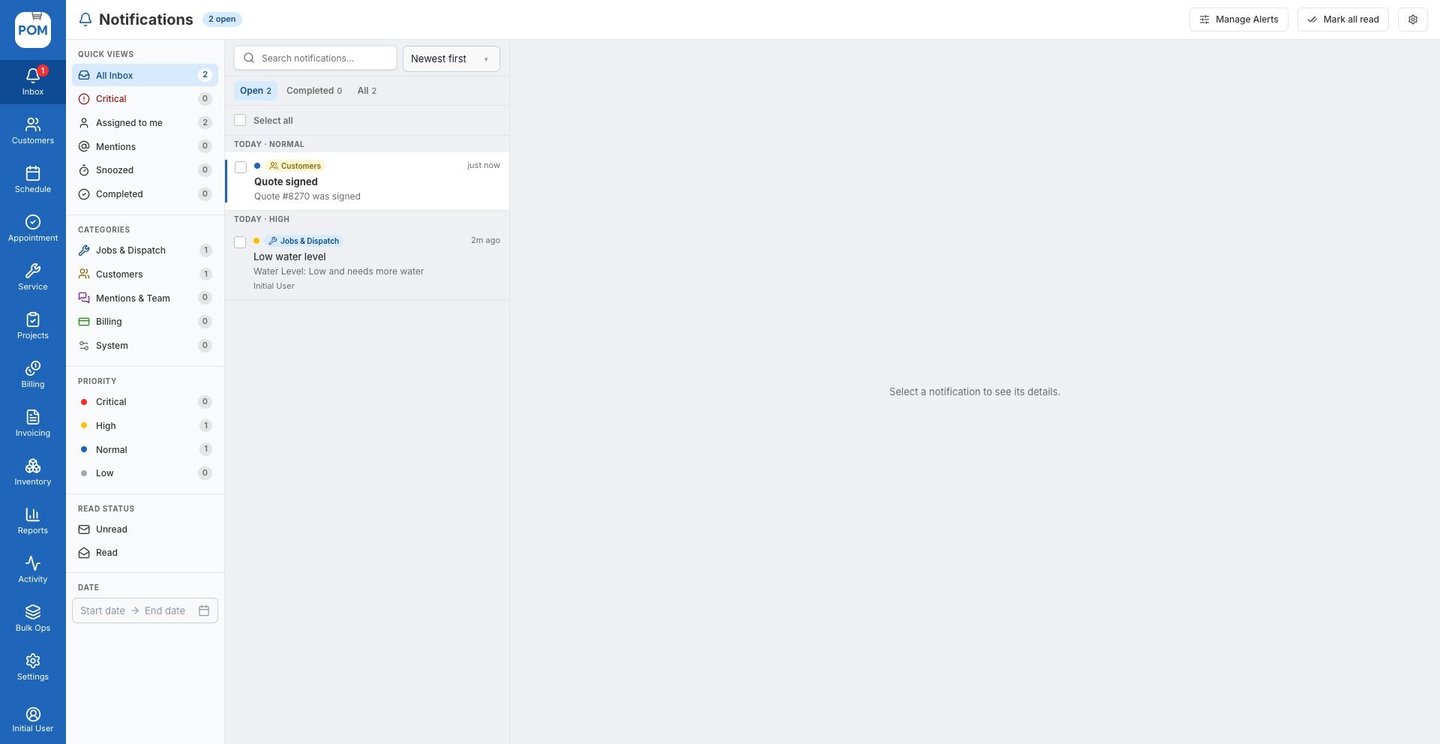
One inbox for everything that needs you
Every alert lands in the Inbox, sorted by priority and category. Filter to Critical, Assigned to me or Mentions, open an alert to see the customer, job and tech it’s about, then mark it complete, reassign it, add a follow-up or snooze it until the time is right.
Built-in alerts, ready to switch on
Job assigned, removed or rescheduled. Job marked complete. @mentions in job notes. Low chemical quantity on hand. A tech running 30+ minutes late. Quote signed. Clock-in reminders. Turn on the ones you want and choose who gets each one.
Built for pool companies
Alerts that fit how your team works
Techs know first
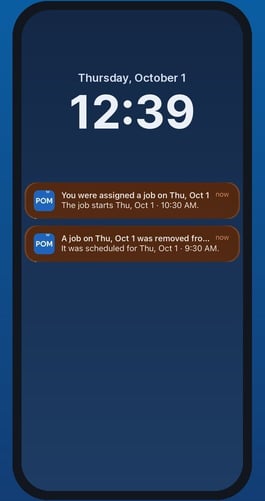
When a job is added to, removed from or moved on a tech’s day, they see a banner in the app right away, or a push notification if they’re in another app.
Sales hears about signed quotes
Add your sales staff and managers to the Quote signed alert and they know the moment a customer signs, with the quote one click away.
Your own rules from the field
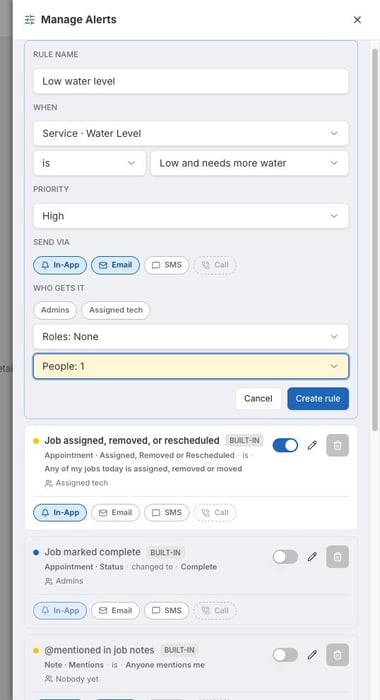
Build alerts from service report readings like water level, chlorine, pH, salt, filter pressure and water condition. Send each one to whoever should handle it.
Custom alerts from service reports
Pick a reading, set the condition, choose a priority and pick the people. For example: when a tech logs the water level as low, alert the service manager at high priority by app and email. The alert arrives with the customer, the service and the tech attached, so the follow-up call takes a minute.
IN THE FIELD
Alerts on every tech’s phone
The POM app shows a banner when a tech’s day changes, and push notifications reach them even when they’re in another app. Nobody drives to a stop that isn’t theirs anymore.
Choose exactly who gets what
Every rule lets you pick In-App, Email or SMS, and send to admins, the assigned tech, a role, or specific people. Priorities (Critical, High, Normal, Low) keep the urgent ones at the top of the inbox.
Keep exploring
Scheduling & routes · The tech mobile app · Water chemistry · Pricing · Watch the tour
We were excited to try this program and have been satisfied with the use. Love the scheduling feature, from an office stand point, and the guys are happy with not having to use paper.
Town & Country
I can easily keep track of my employees progress throughout the day and have the ability to send other techs to fill in if needed. Love the maps optimization feature. Saves time and money
Aqua Clear Pools
Great software program. Keeps our route in order while providing detailed service reports to all of our clients when the cleaning/maintenance is complete
Blue Water Pools
FAQ
Alerts questions
Who gets alerts?
Each rule has its own recipients: admins, the assigned tech, a role, or specific people you pick.
How are alerts delivered?
In the Inbox in POM, by email, and by text message. Techs also get banners and push notifications in the mobile app.
Can I create my own alerts?
Yes. Create a rule from triggers such as appointment status, quotes, invoices, chemical quantities and service report readings like water level, chlorine or pH, then set the condition, priority and recipients.
What happens after an alert arrives?
Open it to see the related customer, job and tech, then mark it complete, reassign it, add a follow-up, snooze it or dismiss it.
Can I turn alerts off?
Yes. Every rule has an on/off switch in Manage Alerts.
Set up your alerts in POM
30 days, every feature, your real route. Card at signup, nothing charged until day 30, cancel anytime. 614-710-0074.