
Scheduling a pool service company isn’t like scheduling anything else: dozens of recurring stops, seasonal starts and stops, one-time repairs dropped into full days, and a route that only makes money when the truck stops driving in circles. Pool Office Manager’s scheduling is built for exactly this.
Your whole week, on one screen
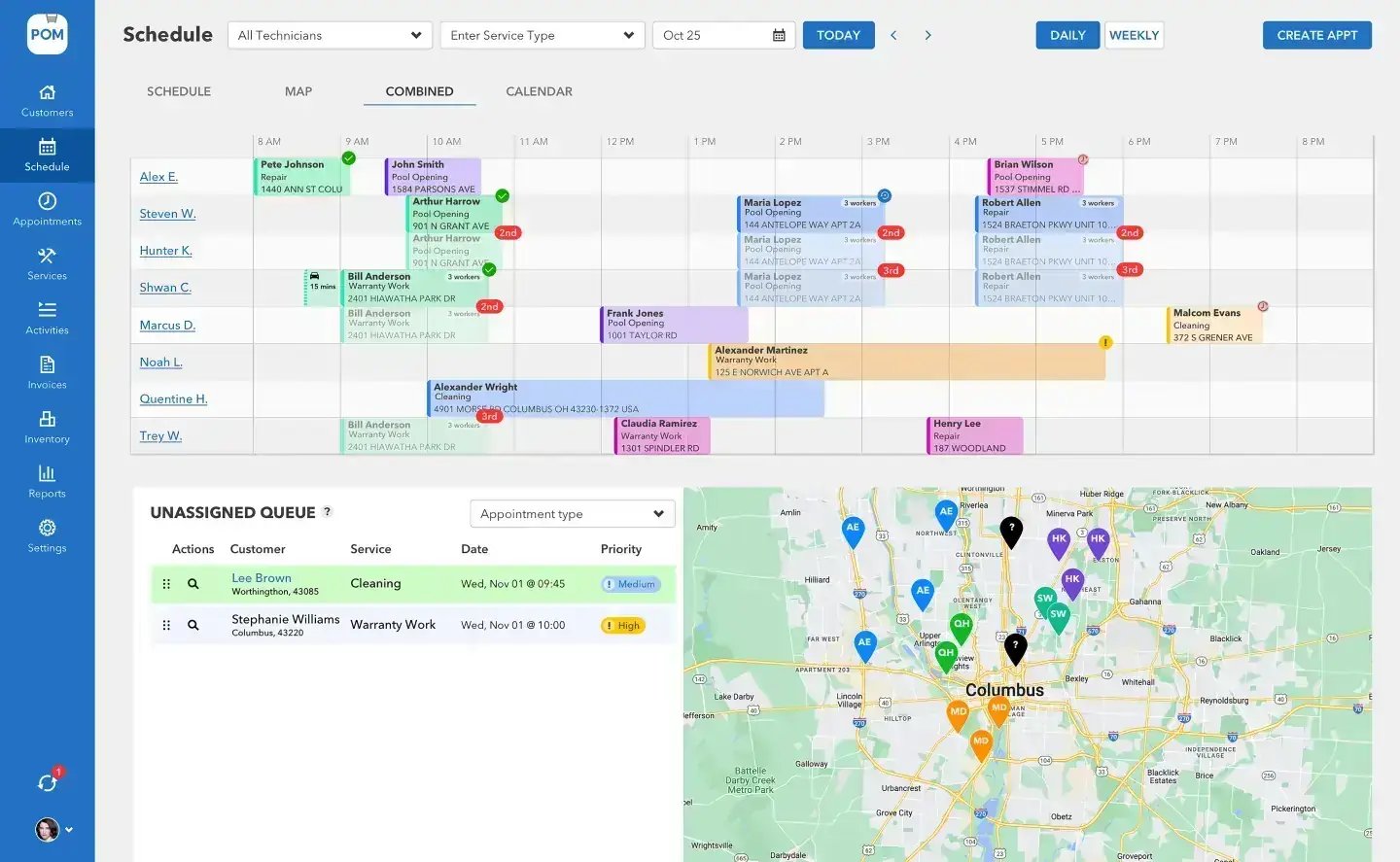
Four ways to see the day
Every company plans differently, so POM gives you four views of the same schedule: Timeline for who’s doing what and when, Map for where the day takes each truck, Combined for both at once, and Calendar for the long view. Switch freely — it’s one schedule underneath.
Drag, drop, done
Assign and reassign visits by dragging them between technicians. A tech calls in sick? Drag their day onto the crew that can absorb it. A repair comes in for Thursday? Drop it into the gap. The Unassigned queue holds work that doesn’t have a home yet, so nothing gets lost between the phone call and the schedule.
Built for pool routes
What makes POM scheduling different
Recurring, the way pools work
Weekly, bi-weekly, every fourth Tuesday, twice a week in summer and monthly in winter. Set the pattern once; the schedule builds itself forward. Seasonal changes are an edit, not a rebuild.
Routes that drive less
Route optimization orders each day’s stops to cut windshield time — the only part of the field day that produces nothing. Tighter loops mean more pools per truck.
Live from the field
As techs start and complete visits, the schedule updates in real time — with GPS-verified locations on the map. You know what’s done and what’s slipping while it can still be fixed.
Watch scheduling, step by step
Short walkthroughs, about 30 to 60 seconds each. Every one has a step-by-step guide in the help center.
The schedule flows straight to the field
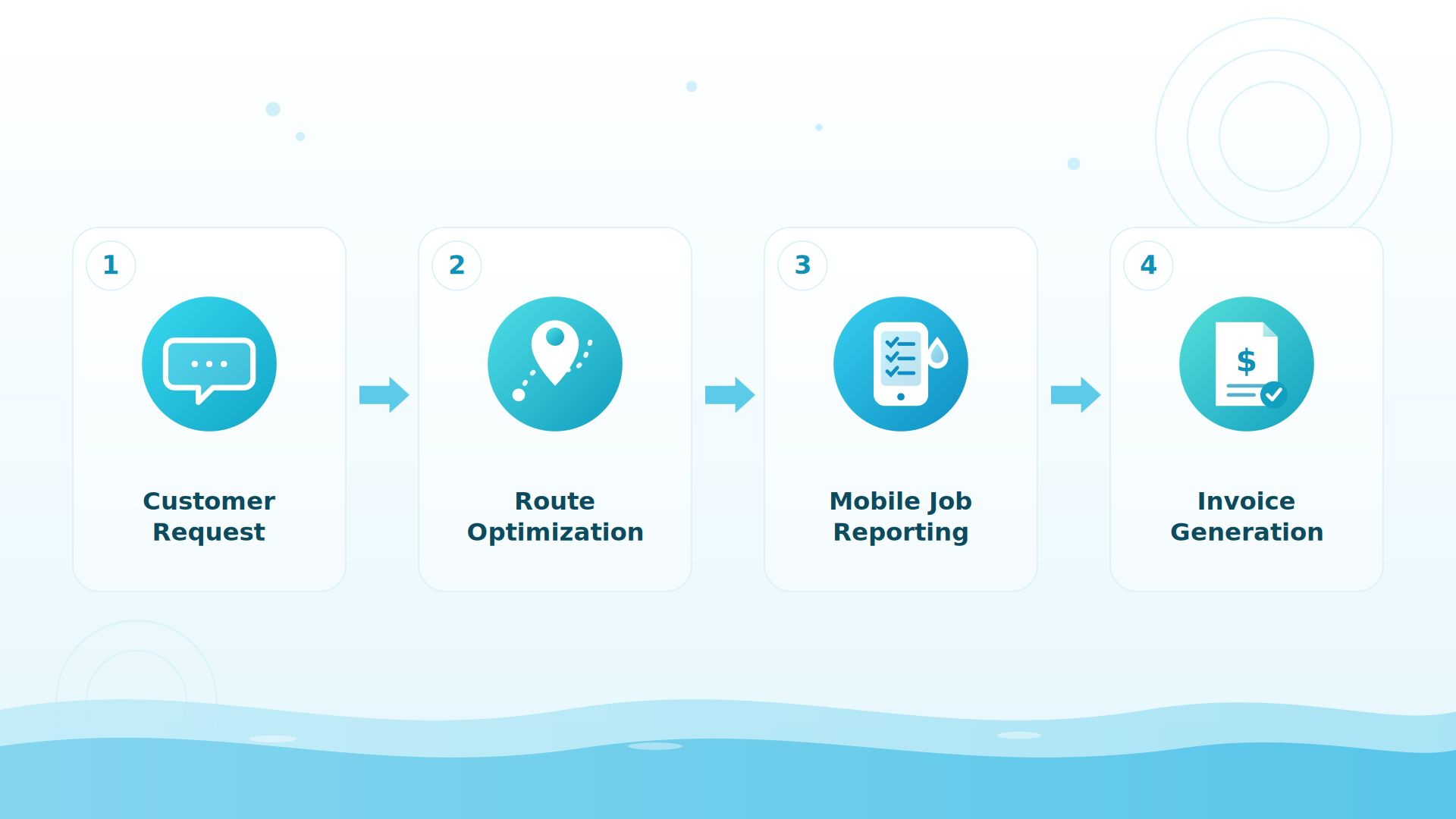
Every tech sees their day in the mobile app the moment you publish it: stops in order, drive times, property details, gate codes, and what happened on the last visit. Changes you make at the desk appear on their phone. No printed route sheets, no morning huddle to re-explain the day, no “where am I going next?” calls.
BIG PICTURE
See it with your own route
Start the 30-day trial, or book a 20-minute setup call (614-710-0074) and we’ll build your first week of schedules with you, live.

Handle the day the field actually throws at you
Weather delay? Shift the afternoon without touching the rest of the week. Tech out sick? Their day drags onto another truck in seconds. A one-time cleanup lands in the middle of a full Tuesday? The unassigned queue and the map show you exactly where it fits with the least driving. The perfect schedule is worthless the moment reality shows up — POM is built for the imperfect days.
Customer-reported results
Companies using POM tell us they spend about 50% less time on daily office tasks and get 100% visibility into every job. The schedule is where most of that time comes back: less re-explaining, fewer calls, no retyping the day into route sheets.
Keep exploring
The tech mobile app · Reports & visibility · Short-staffed? Route playbook · Pricing · Watch the tour · The pool closing playbook
We were excited to try this program and have been satisfied with the use. Love the scheduling feature, from an office stand point, and the guys are happy with not having to use paper.
Town & Country
I can easily keep track of my employees progress throughout the day and have the ability to send other techs to fill in if needed. Love the maps optimization feature. Saves time and money
Aqua Clear Pools
Great software program. Keeps our route in order while providing detailed service reports to all of our clients when the cleaning/maintenance is complete
Blue Water Pools
FAQ
Scheduling questions
Can I optimize the order of stops on a route?
Yes — route optimization (powered by Google’s route engine) orders each day’s stops to minimize drive time, up to 25 stops per day per route.
How do recurring schedules handle the off-season?
Change the pattern and the schedule rebuilds forward — twice-weekly summer service can drop to monthly winter checks with one edit. You can also deactivate users for the off-season so you stop paying for idle seats.
What do my techs see?
Their whole day in the mobile app: stops in order, drive times, property details, gate codes, equipment notes, and last visit’s history — updated live as you make changes at the desk.
How fast can we be up and running?
Most companies build their first week of schedules on the 20-minute setup call, and most techs are comfortable with the app within their first day of service.
What is the best pool service scheduling software for a small company?
The best scheduling software for a small pool company is one your techs learn in a day and that handles seasonal reality — recurring visits, weather delays, and one-off repairs — without a rebuild. Pool Office Manager does exactly that: four schedule views, drag-and-drop dispatch, Google-powered route optimization, and flat pricing at $125/mo for the first user + $25 per additional user.
How many stops can route optimization handle?
POM’s route optimization, powered by Google’s route engine, orders up to 25 stops per day per route to minimize drive time — the only part of the field day that produces nothing.
How do pool companies handle rain delays and reschedules?
Shift the affected visits without touching the rest of the week: drag them to another day, or apply a change to “this and all following” occurrences. Techs see the updated day on their phones immediately — no call-around.
Run next week in POM
30 days, every feature, your real route. Card at signup, nothing charged until day 30, cancel anytime. 614-710-0074.